 MyGNU.de
Using CreationWorkshop on Linux with NVIDIA graphics
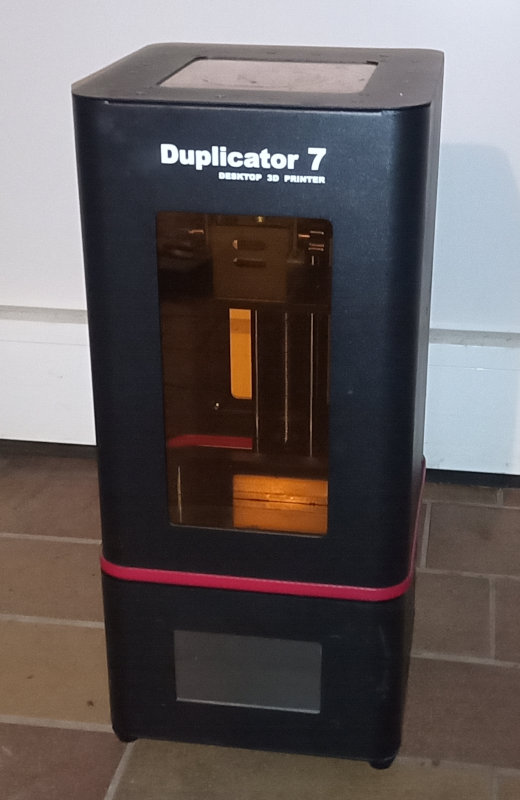
The Resin 3D DLP printer Wanhao Duplicator 7 originally has been offered with the free slicing software Creation Workshop available for download.1 Later on Wanhao seems to have bought the software company behind Creation Workshop and have developed new version, Wanhao D7 Workshop. The original download locations for the free software vanished. Users who have bought the printer after November 2018 were able to get a free license key. Others, who bought it before or obtained a used printer, had to buy one. Fortunately a user made the binaries of the original free opensource version available for download again at dropbox.2
Download: https://www.dropbox.com/s/ytu5yoo2ltut5a2/Creation_Workshop_D7_v1.0.075.zip?dl=0
Creation Workshop has been developed using .Net C# and can be used with Mono with Linux. Unfortunately this version of the Software does not work with mono on Linux depending on graphics hardware. There also has been a report of Creation Workshop crashing on the Raspberry Pi.3 45 From what I can tell it works with Intel graphics boards, but crashes with NVIDIA graphics boards. When running Creation Workshop with nvidia-drivers, it shortly opens a black window and then crashes with the console output below:
X11 Error encountered:
  Error: BadMatch (invalid parameter attributes)
  Request:     151 (5)
  Resource ID: 0x840006E
  Serial:      1568
  Hwnd:        Hwnd, Mapped:False ClientWindow:0x840006E, WholeWindow:0x840006D, Zombie=False, Parent:[Hwnd, Mapped:True ClientWindow:0x8400064, WholeWindow:0x8400063, Zombie=False, Parent:[Hwnd, Mapped:True ClientWindow:0x8400062, WholeWindow:0x8400061, Zombie=False, Parent:[Hwnd, Mapped:True ClientWindow:0x8400060, WholeWindow:0x840005F, Zombie=False, Parent:[Hwnd, Mapped:True ClientWindow:0x840005E, WholeWindow:0x840005D, Zombie=False, Parent:[Hwnd, Mapped:True ClientWindow:0x840005C, WholeWindow:0x840005B, Zombie=False, Parent:[Hwnd, Mapped:True ClientWindow:0x840005A, WholeWindow:0x8400059, Zombie=False, Parent:[Hwnd, Mapped:True ClientWindow:0x8400058, WholeWindow:0x8400057, Zombie=False, Parent:[<null>]]]]]]]]
  Control:     UV_DLP_3D_Printer.GUI.Controls.ctlGL  at System.Environment.get_StackTrace () [0x00000] in <a6a5ba8fc13a4797a32a4dc4ae25c772>:0
  at System.Windows.Forms.XplatUIX11.HandleError (System.IntPtr display, System.Windows.Forms.XErrorEvent& error_event) [0x00000] in <f8f55e5d29ae400f8589d196b5502445>:0
  at OpenTK.Platform.X11.Glx.MakeCurrent (System.IntPtr , System.IntPtr , System.IntPtr ) [0x00000] in <6e87929761c543a4bfb6d5acaea62619>:0
  at OpenTK.Platform.X11.Glx.MakeCurrent (System.IntPtr display, System.IntPtr drawable, OpenTK.ContextHandle context) [0x00000] in <6e87929761c543a4bfb6d5acaea62619>:0
  at OpenTK.Platform.X11.X11GLContext.MakeCurrent (OpenTK.Platform.IWindowInfo window) [0x00000] in <6e87929761c543a4bfb6d5acaea62619>:0
  at OpenTK.Graphics.GraphicsContext.MakeCurrent (OpenTK.Platform.IWindowInfo window) [0x00000] in <6e87929761c543a4bfb6d5acaea62619>:0
  at OpenTK.GLControl.MakeCurrent () [0x00000] in <1b9440a0f8834418a8d369f909728a32>:0
  at OpenTK.GLControl.OnHandleCreated (System.EventArgs e) [0x00000] in <1b9440a0f8834418a8d369f909728a32>:0
  at System.Windows.Forms.Control.WmCreate (System.Windows.Forms.Message& m) [0x00000] in <f8f55e5d29ae400f8589d196b5502445>:0
  at System.Windows.Forms.Control.WndProc (System.Windows.Forms.Message& m) [0x00000] in <f8f55e5d29ae400f8589d196b5502445>:0
  at System.Windows.Forms.ScrollableControl.WndProc (System.Windows.Forms.Message& m) [0x00000] in <f8f55e5d29ae400f8589d196b5502445>:0
  ...
From the output there seems to be a problem with OpenTK.Graphics, which turns out to be an incompatibility of the bundled version of the OpenTK .Net wrappers libraries bundled with this version of Creation Workshop. To fix this problem one can download newer versions of the wrapper dlls, which work together with nvidia-drivers, from nuget.org.
Downloads can be found here: opentk.2.0.0.nupkg and here: opentk.glcontrol.3.1.0.nupk.
After downloading, the dlls can be extracted from the nupk files using unzip. Then replace the the files OpenTK.dll and OpenTK.GLControl.dll in the Creation Workshop directory with the newer ones from the nuget packages.
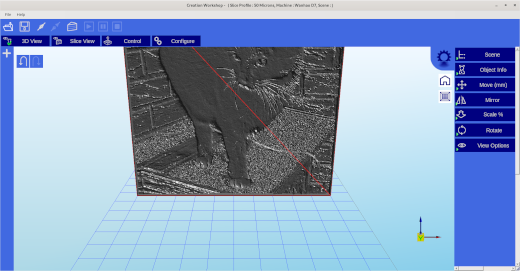
Afterwards Creation Workshop can simply be started from the terminal:
mithrandir@galadriel ~/Creation_Workshop_D7_v1.0.075 $ mono CreationWorkshop.exe
This way Creation Workshop has been run on Gentoo Linux on X86_64 architecture and on a NVIDIA Jetsons TX2 board with ARM64 architecture. Other platforms like the Raspberry, reported to be problematic, might work as well.
Jürgen
- theoddartisan.com: wanhao-duplicator-7-d7-v1-5-setup-tutorial/
- google groups: D7 Plus – Some setup information
- buildyourownsla.com : Creation Workshop on Linux
- buildyourownsla.com: CW does not work on Linux
- buildyourownsla.com: Problem launching CW on Ubuntu Linux 14.10
 (No Ratings Yet)
 Loading...

![[Valid RSS]](https://validator.w3.org/feed/images/valid-rss.png "Validate my RSS feed")


