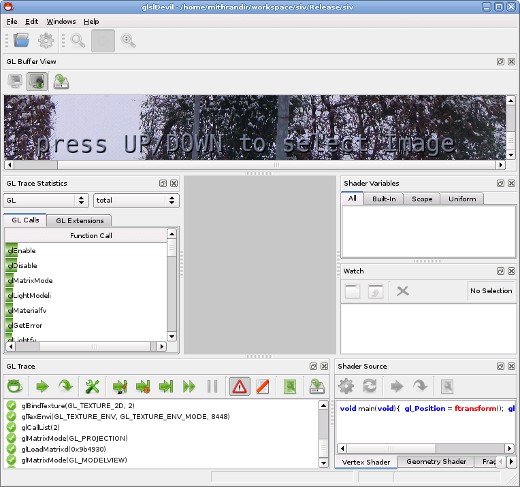
Some days ago I wanted to get some information on how OpenSceneGraph internally performs the rendering, to prepare for my B.Sc. thesis. Especially I wanted to know if it really uses Vertex Buffer Objects when I “force” Graphics Nodes to do so. Code analysis would have taken to long and would not have been proof enough for me. Thus I needed an OpenGL debugger. A nice one I found is glsldevil, which was developed at the university of Stuttgart. It can not only debug pure OpenGL, but also GLSL shaders.
glsldevil
For gentoo I found an old ebuild somewhere in the web and modified it for the new version of glsldevil. Here is my overlay including the modified ebuild:
During my last kernel upgrade I recognized that the iptables mirror target I published here, here and here does not work anymore with kernel version 2.6.36. You can download the newer version for 2.6.36 and probably future kernels here:
To build the module, boot the kernel you want to use the module with. Afterwards unpack the archive, run the compile.sh script and the install.sh script.
Now you may use the mirror target in place of the reject or drop target in the INPUT, FORWARD and PREROUTING chains, like this in your firewall script:
$IPTABLES -A INPUT -j MIRROR
Beware: The use of the mirror target may have strange results, i.e. if you want to connect to the iptables protected machine, you may end up connecting to the local machine without recognizing it. It also may use much bandwith. Worst case: if you have two machines using this module they may end up playing pingpong. So you have been warned, use with caution and at your own risk. For more information see: MIRROR target.
Downloads for older kernel versions are below. Notice the version numbering 2.6.25 works for kernels up to 2.6.27. 2.6.28 also works for 2.6.29 and 2.6.30 kernels. The 2.6.13 version of the module should work up to kernel version 2.6.16.
It seems that the stereo context in FlightGear does not get initialized properly in WindowBuilder::makeDefaultTraits(bool stencil). Thus these lines have to be added to WindowBuilder.cxx. For convenience here is the patch against FlightGear-2.0.0:
Perhaps some nice FlightGear developer can include this into upstream code. You have to use a professional graphics board that supports quad buffered stereo, like a NVIDIA Quadro FX or a Ati FireGL and proper display hardware, like shutter glasses, a HMD or a stereoscopic projection system, to benefit from it.
Problems remaining
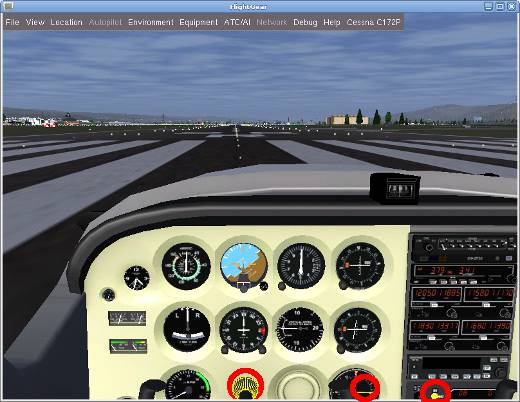
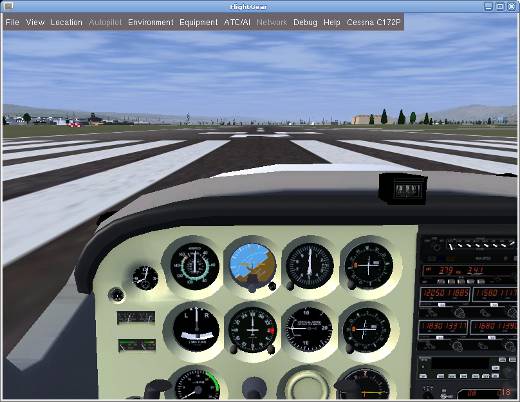
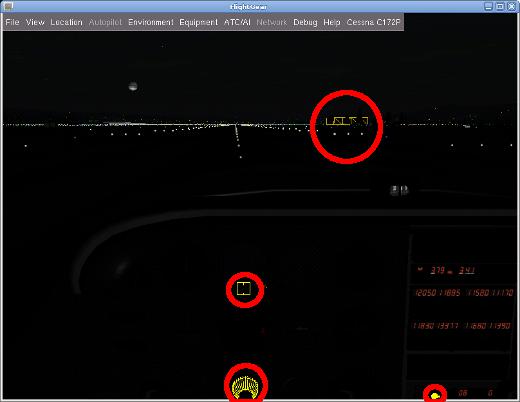
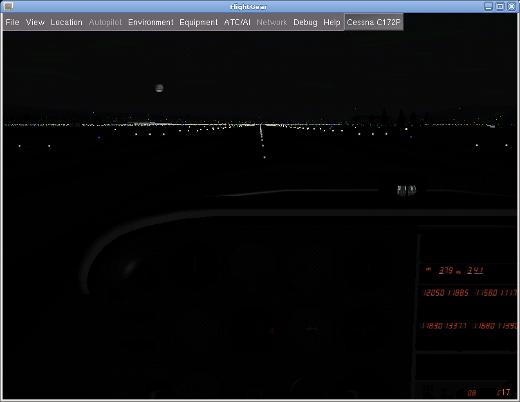
When using the quad buffered stereo mode in flightgear there occur some graphics errors. These are not very annoying, but they are there. Some cockpit controls and other scene details contain yellow lines, like a wireframe, which are not there when starting FlightGear in “normal” display mode. I suspect this to be another bug in FlightGear, which has still to be located. See the screenshots below for details. The problematic parts of the scenes are marked red. Especially the night pictures show the problem. This problem does not only exist in quad buffered stereo mode, but also in other stereo modes like HORIZONTAL_SPLIT.
FlightGear by day, quad-buffered stereo, with errors
FlightGgear by day, no stereo, without errors
FlightGear by night, quad-buffered stereo, with errors
FlightGear by night, no stereo, without errors
The Gentoo way
For gentoo users here is my overlay including the modified ebuild:
Download the modified overlay (including the patches) and extract it in /usr/local/portage. Be sure to include the following line in your /etc/make.conf:
PORTDIR_OVERLAY=”/usr/local/portage”
Then emerge flightgear and enjoy it in three dimensions.
Did you ever miss the functionality to perform a full text search in multiple pdf files from the command line in linux?
With the linux command grep one can search for a given text in multiple files. If you don´t know it already you can find some information about grep here. Sadly it can not be used for searching in pdf files, which is certainly an important task. Imagine you have some thousand pdf files archived on your harddrive and you are looking fore some information contained in them. It is far to much work to open each of them in your pdf viewer and search for the needed information. In this situation a tool like grep is quite handy.
A few days ago I found the interesting tool pdfgrep. It works similar to grep, but can search in pdf files. You can download it from SourceForge. Then build pdfgrep from source.
For gentoo users, as usual there is a more easy way. I wrote a simple ebuild for pdfgrep. You can download the ebuild here:
Be sure to include the following line in your /etc/make.conf.
PORTDIR_OVERLAY=”/usr/local/portage”
Afterwards just emerge pdfgrep.
Sadly pdfgrep is not capable of recursively searching complete directory structures like one can do with egrep -r. This would enable one to search complete pdf collections. Not a big problem. Just use the following line of code:
Last year I published the first version of my linux headtracking driver for the VR920 HMD here. Currently I am working on a new driver version which will have the following additional features:
Multiple Protocols: -UDP multicast (as before) -UDP unicast (for flightgear connection and perhaps more) -mouse emulation (via uinput) -joystick emulation (via uinput) -character device for direct angle readings (via cuse, will require a kernel >= 2.6.31)
Inverting of axes (to have moving the head up making the mouse pointer up or down, depending on needs)
Scaling of data (i.e. to match screen size with mouse mode)
Customisable delay between sensor readings
User interface separated from the driver
With the upcoming MPX and the mouse emulation it should be possible to control the visible viewport by turning around the head. Controlling the view for games or other software that do not natively support headtracking should also be possible with the emulation.
In the current development stage most of the features are basically working so expect the new driver to be released soon.
The MeeGo Project has released the version 1.1 for Intel Atom and ARMv7 for Download. MeeGo is the fusion of Intels Netbook OS Moblin and Nokias Maemo. The new Linux distribution is available with three different Desktops.
The Version User Experience (UX) for Netbooks uses the well known GTK Interface of the Moblin distribution. The variant for In-Vehicle Infotainment (IVI) is optimized for in car use. The third variant Handset UX is designed for use with mobile phones and internet tablets. Handset UX should work on N900 Nokia mobile phones and is planned to be installed on the new N9 instead of Symbian-OS.
 MyGNU.de



![[Valid RSS]](https://validator.w3.org/feed/images/valid-rss.png "Validate my RSS feed")


