Recently I wrote about bino, a stereoscopic video player that is usable with linux and also supports quad buffered stereo. In the meanwhile the versions 0.9.1 and 0.9.2 have been released. The new version includes multithreading to read, decode, and display video data in parallel, for better performance and some bugfixes.
Bino still does not work properly with linux, at least it still does not display anything on my gentoo box. The patch for bino, I provided here, does not work anymore.
Problems
At least on my gentoo box bino failed to display anything. When starting bino it failed with a window popping up:
Cannot set GL context format
The reason for this was the same as before. Bino was requesting an alpha visual, which did not succeed. I have not seen the point in requiring an alpha visual for bino, so I just removed this. You may download the patch from here:
Addon: The patch is only necessary when the X server does not provide an alpha visual, which may i.e. be the case when using only 16 bits of colour depth.
Download the modified overlay (it includes the patches) and extract it in /usr/local/portage. Be sure to include the following line in your /etc/make.conf:
PORTDIR_OVERLAY=”/usr/local/portage”
Then emerge bino and enjoy viewing your 3d movies again.
As I promised in New version of the vr920 headtracking driver coming soon here is the new version of my headtracking driver for the Vuzix VR920 iwear for Linux. It calculates yaw, pitch and roll from the accelerometer and magnetometer data (The device has got three of each). This makes a 3DOF tracking possible and allows you to look around in a 3D Scene. In example you can use the driver with my stereoscopic image viewer SIV. The driver averages the sensor readings with an improved algorithm, which gives a far smoother experience than with the initial driver version. The driver package consists of a daemon which can be run in the background and for convenience a basic control application that enables one to easily tweak the various driver settings and to callibrate the device. For general Information on how to use the device with Linux see: Vuzix VR920 with Linux and active 3D stereo.
The driver provides the trackingdata in different formats to the application using it. It always writes the data to /dev/headtracking. A line read from /dev/vrtrack consists of six floats that correspond a sensor reading in this format:
yaw pitch roll x y z
Yaw, pitch and roll are angles from 0 to 360 degrees. X, y and z are always zero for the vr920, since it only supports three degrees of freedom. These values are reserved for future devices which may support six degrees of freedom, in the hope to propose a standard for tracking devices.
The driver can scale the readings and invert the axes independantly to get the needed value range for the used application and a pleasant experience.
For maximum compatibility with existing applications there are four other modes of operation available that can be enabled separately:
Joystick emulation The driver emulates a joystick device /dev/input/jsX. The readings for yaw, pitch and roll are the X,Y and Z axis of the emulated joystick. This may be used to enable basic headtracking support in games that do not natively support headtracking.
Mouse emulation The driver emulates a joystick device /dev/input/mouseX. The readings for yaw and pitch are being translated to X and Y of the mouse device, so when you look right the mouse pointer moves to the right and when you look up the pointer moves upwards and vice versa. This may also be used to enable basic headtracking support in games that do not natively support headtracking. It can also be used to just control the mouse pointer of the window system. Controlling the viewport of the window system can also be a resonable purpose. With the new MPX extension in xorg this may be possible.
UDP – network In UDP mode the driver sends the tracking data via network as UDP unicast. The approach to send the data out via network makes the language used for writing the application independant from the language used for developing the driver. The packet sent to the clients contains the three angles, yaw, pitch and roll and x,y and z as 32 bit fixed point in Q16.16 format. This mode may i.e. used to control flightgear.
Multicast – network In multicast mode the driver sends the tracking data via network as UDP multicast, thus many clients may read the data, which makes parallelization more possible, i.e. one could use one machine for rendering and another machine for calculations. In addition to this, the approach to send the data out via network makes the language used for writing the application independant from the language used for developing the driver. The tracking data sent to the clients contains the three angles, yaw, pitch and roll and for easy usage a viewmatrix, one can directly use with scenegraph libraries. If you intend to develop an application using the headtracking of the VR920 see the file democlient.cpp included in the download for details on how to get the data into your application. This mode is used by the stereoscopic image viewer SIV.
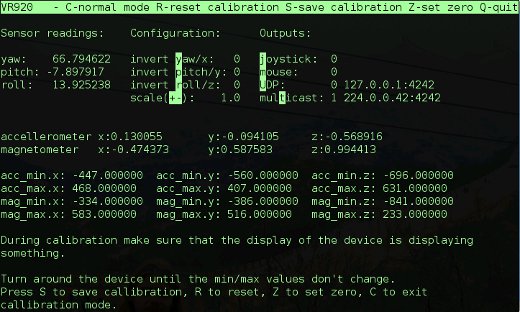
Below is a screenshot of the control application during callibration of a vr920 device:
Important note: During calibration make sure that the display of the device is displaying something. Since the displays not only showing a blue screen influences the sensor data (at least with my device) you’ll end with wrong calibration else. You may use i.e. nvidia-settings to ensure this.For detailed usage instructions see the readme included in the download.
Download:
I decided to publish the driver under the creative common noncommercial license. You may download the full source from here:
. An Archlinux PKGBUILD provided by Feilen is available here: aur.archlinux.org More binary/distribution specific formats may be available in the future. The x86_64 binary has been build on an up to date gentoo system, the i686 binary on ubuntu hardy. For the i686 binary you may install libconfig++ i.e. libconfig++8_1.3.2-2 from here: libconfig++ If none of the binaries works for you, you may have to build from source…
You need to have libusb, libconfig++, libfuse and libcurses installed on your system. For ubuntu users I included the small shell script ubuntu_install_deps.sh that installs the dependencies. Maybe it works also for for other Debian-based distributions. Gentoo users just have to make sure that libusb, ncurses, fuse, and libconfig have been emerged. Your kernel version has to be at least 2.6.31 and you must have cuse enabled in your kernel.
Footnote:
If you like the driver, feel free to link to www.mygnu.de. If you developed an application using the tracking data provided by the driver please leave a comment, because then I can review the application and eventually write about it. To request commercial licenses contact us at info(at)mygnu.de. Well, if you just want to support our work on MyGNU.de use the donate button 😉
One year ago I provided a patch for mplayer which included support for quad-buffered stereo, enabling mplayer to display stereoscopic movies. In the meanwhile mplayer-1.0_rc4_p20101114 arrived in portage. As before with the original patch from Stuart Levy, my one does not work anymore due to some changes in mplayers gl2 driver. So I had to modify the patch again to work again with newer mplayer versions. You may download the updated patch from here:
The patch should work at least with nvidia quadro boards, probably with some others. It can be used with CRT and generic shutter glasses or HMDs like the Vusix VR920. Some stereoscopic sample movies for trying it out can be found on www.3d.wep.dk.
The Gentoo way
For Gentoo users I again modified the mplayer ebuild from portage to include the patch. The modified ebuild is available here:
The older ebuild and patch are still available on mygnu.de.
To use the ebuild it just copy it to /usr/local/portage/media-video/mplayer and copy the the patch to the “/usr/local/portage/media-video/mplayer/files” directory. You probably have to create these directories. Then run
Last year I wrote about bino, a stereoscopic video player that is usable with linux and also supports quad buffered stereo. In the meanwhile the versions 0.8 and 0.8.1 have been released. Thanks for your work, Martin. The new versions contain some bug fixes and the following new features:
Adjustable ghostbusting to reduce crosstalk artifacts.
Parallax adjustment.
Mouse-based seeking.
Initial support for choosing an audio stream.
Improved compatibility with many video types.
Bino still does not work properly with linux, at least it does not display anything on my gentoo box. The good news is that my patch for bino, I provided here, still works.
The Gentoo way
For gentoo users here is my overlay including the ebuild:
A while ago I updated the stereocopic mplayer patch to work again with newer mplayer versions. This patch worked to display side by side stereo movies in quad buffered stereo mode but it did not enable mplayer to display stereo videos consisting of two separate video streams for the right and the left eye like those produced with Fujifilm Real 3D cameras. A player capable of displaying these files and many other stereoscopic movie formats is bino. I recognized that bino is also capable of displaying a single video stream in quad buffered stereo mode. For a future version it would be really nice to have it calculating a 3D version of the stream on the fly and displaying this fake stereo video. There are some algorithms known that are capable of doing this calculation. It should be possible to do this in parallel on the GPU, so processing power should not be the problem… Of course such a fake stereo video cannot have the quality of a real stereo one, but it may be the only possibility to watch ones favorite movie in stereo.
Problems
At least on my gentoo box bino failed to display anything. When requesting quad buffered stereo (bino -o stereo) it failed with:
bino: [err] display does not support stereo mode
When trying to start bino without quad buffered stereo it failed with:
bino: [err] cannot set GL context format
The reason for this was found quickly. Bino was requesting an alpha visual, which did not succeed. I have not seen the point in requiring an alpha visual for bino, so I just removed this. You may download the patch from here:
Download the modified overlay (it includes the patch) and extract it in /usr/local/portage. Be sure to include the following line in your /etc/make.conf:
PORTDIR_OVERLAY=”/usr/local/portage”
Then emerge bino and enjoy viewing your 3d movies.
I am proud to present a new version of SIV, the stereoscopic image viewer for Linux I published on MyGNU.de. It should be compilable also on MacOS and Windows, but I have never tested this. SIV is capable of displaying JPS stereo images and MPO stereo images in different stereo modes. It is tested in fullscreen/windowed mode with anaglyphic and quad buffered stereo mode. Different output devices I tested were my Vuzix VR920 and relevator shutter glasses on Nvidia Quadro FX 350M and FX 3700.
siv-1.1 the stereoscopic image viewer
Key Features
support for side by side JPS stereo images
support for MPO stereo images (used by Fujifilm Finepix Real 3D cameras)
many display modes, including quad buffered stereo
headtracking support for the Vuzix VR920 HMD (driver available on mygnu.de)
black-white and sepia filter
controls for gamma, brightness, contrast and parallax
on screen display
Basic usage You may supply one or multiple .jps or .mpo files at the command line. I.e. siv *.jps will display all JPS files in the current folder. Once the first image of the list is being displayed you may use CURSOR_UP/DOWN or the mouse wheel to select a different image for being displayed. You can enable/disable the slideshow mode by pressing the [Enter] key. When displaying an image the filename of the image is displayed in the lower left corner for a few seconds. Using the number keys one may select different ways to zoom/navigate in the image. In VR920 mode or normal trackball mode use the right mouse button together with mouse movements to zoom the image. You can use the middle mouse button together with movements to pan the image. While displaying an image you may alter gamma, brightness, contrast and parallax for the best viewing experience. Some images may look better in black-white or sepia mode. By pressing the [t] key you may toggle these filters. The filters and controls use shaders on the GPU, so if you experience problems with these options you may disable them with the –disable-shaders commandline switch. At present the shader code is only tested on Nvidia hardware. If you have tested it on Intel/ATI please leave a comment.
Headtracking If you want to try out the VR920 headtracking, enable the headtracking support with the “–vr920” option. You may want to specify the distance to the image with the “-d” option. Values between 0.25 and 0.5 seem to have a nice effect when using the headtracking. When headtracking is active you may press [z] to set the zero view so that with your current head position you will see the center of the image. If you want to manipulate the view manually press the left or mittle mouse button as described above and move the mouse. The “-m” and “-p” options allow to set IP-address and port for the connection to the headtracking driver.
Commandline Usage
siv [options] stereofile(s)
Options: –CullDrawThreadPerContext Select CullDrawThreadPerContext threading model for viewer. –CullThreadPerCameraDrawThreadPerContext Select CullThreadPerCameraDrawThreadPerCo- ntext threading model for viewer. –DrawThreadPerContext Select DrawThreadPerContext threading model for viewer. –SingleThreaded Select SingleThreaded threading model for viewer. –accum-rgb Request a rgb accumulator buffer visual –accum-rgba Request a rgb accumulator buffer visual –cc Request use of compile contexts and threads –clear-color <color> Set the background color of the viewer in the form “r,g,b[,a]”. –disable-shaders disable shaders for unsupported graphics boards –display <type> MONITOR | POWERWALL | REALITY_CENTER | HEAD_MOUNTED_DISPLAY –filter=[bw|sepia] enable filter on startup –rgba Request a RGBA color buffer visual –samples <num> Request a multisample visual –screen <num> Set the screen to use when multiple screens are present. –serialize-draw <mode> OFF | ON – set the serialization of draw dispatch –stencil Request a stencil buffer visual –stereo Use default stereo mode which is QUAD_BUFFER if not overriden by environmental variable –stereo <mode> ANAGLYPHIC | QUAD_BUFFER | HORIZONTAL_SPLIT | VERTICAL_SPLIT | LEFT_EYE | RIGHT_EYE | HORIZONTAL_INTERLACE | VERTICAL_INTERLACE | CHECKERBOARD | ON | OFF –vr920 enable headtracking support for the vuzix vr920 hmd –window <x y w h> Set the position (x,y) and size (w,h) of the viewer window. -O <option_string> Provide an option string to reader/writers used to load databases -d distance (values between 0.0 and 1.0 are senseful) -e <extension> Load the plugin associated with handling files with specified extension -h or –help Display this information -l <library> Load the plugin -m non default multicast ip -p non default multicast port -s start in slideshow mode -t delay for slideshow mode, defaults to 15 sec
You may notice that most of the options come from osgViewer, which is the base class for the viewer. This gives the advantage, that one can use the “normal” osgViewer controls such as flying around the scene. Try to press [f] for toggling fullscreen mode or press [s] for toggling the onscreen stats (fps, etc.) display.
Download
I decided to publish the viewer under the creative common noncommercial license. Make sure you have the OpenSceneGraph library installed before trying to compile or run the viewer. You may download the full source (Eclipse Project) from here:
. More binary formats may be available in the future. Fore the x86_64 binary you’ll need OpenSceneGraph-2.8.2. Binaries of the OpenSceneGraph library for most linux distributions can be downloaded from www.openscenegraph.org. On gentoo one can just emerge openscenegraph.
Building from source For building from source unpack the zip and cd to siv/Release and run make.
Possible Problems As default SIV starts in fullscreen quad buffered stereo mode. Thus if your graphics hardware does not support this mode, the viewer will exit with the following error:
Error: Not able to create requested visual. GraphicsWindow has not been created successfully. Viewer::realize() – failed to set up any windows
In this case try anaglyphic mode or the apropiate 3D mode for your hardware (see the –stereo option). For instructions on how to get the xserver to work in stereoscopic mode see: Vuzix VR920 with Linux and active 3D stereo
History SIV-1.1 -support for the new MPO file format -black-white and sepia filter -controls for gamma, brightness, contrast and parallax -improved OSD -manual controls in vr920 headtracking mode
SIV – first version -initial realease with support for jps files, quad buffered stereo and various other display modes
Footnote If you like the viewer, feel free to link to www.mygnu.de. To request commercial licenses contact us at info(at)mygnu.de. Well, if you just want to support our work on MyGNU.de use the donate button 😉
have fun, enjoy the 3rd dimension and have a merry Christmas
Last year I published the first release of my stereoscopic image viewer, SIV here. At the time it was the first viewer for Linux supporting jps files and quad buffered stereo. As far as I know it is still the only one with support for the headtracking of the VR920 head mounted display. Currently I am working on a new and better version which will have the following additional features:
native support for the MPO file format (used by Fujifilm stereo cameras)
adjustments for -parallax -brightness -contrast -gamma
Improved OSD
Filters -black/white -sepia
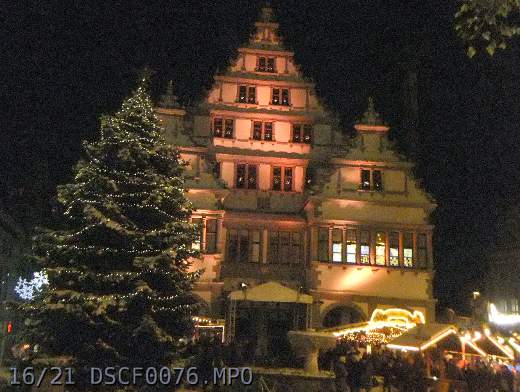
In the current development stage most of the features are basically working so expect the new version of the viewer to be released soon. I hope to get it ready for Christmas, for those of you who have their new 3D camera under the Christmas tree.
 MyGNU.de



![[Valid RSS]](https://validator.w3.org/feed/images/valid-rss.png "Validate my RSS feed")


