There are no ebuilds for Teamspeak Server 3.0.0 and Teamspeak client 3.0.1 available in the net. Thus I modified the old one to match my needs. It has not been a difficult task, but surely someone will be happy to have the ebuild. If the automatic download fails, please download the distfiles from Teamspeak Servers.
Today I recognized my Staroffice 8 not starting any more on my gentoo box. I know, StarOffice is old, but it is still doing the job and most newer word processors just have tons of more features that, to be honest, most people do not use. For most real work I use Latex, but StarOffice enables me to write a short document on the fly and to open Microsoft Office files.
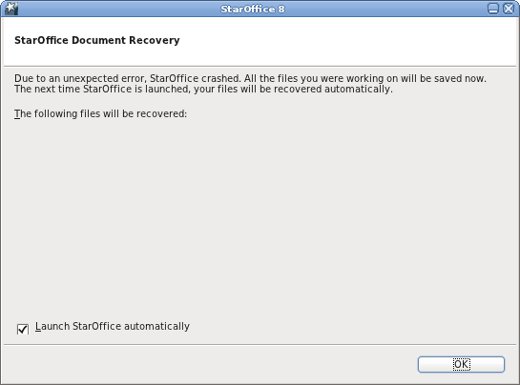
When trying to start StarOffice it instantly crashed with the following dialog (Translated to english language with export LC_ALL=C):
No further Information in the console or where ever was available. I already thought about unistalling StarOffice and installing a newer word processor like OpenOffice, then I remembered that StarOffice is a 32bit application, which uses the 32bit emulation libraries on an amd64 system. Well, I also have remembered, that there recently has been an upgrade of the emul-linux-x86-libs to version 20110722. With try and error I found out that emul-linux-x86-baselibs-20110722 was the one which was causing the problem. Most probably emul-linux-x86-baselibs-20110722 is also incompatible to other applications.
To solve the problem include
>=app-emulation/emul-linux-x86-baselibs-20110722
into your /etc/portage/package.mask file to prevent the newer emul-linux-x86-baselibs from getting emerged.
Well, emul-linux-x86-motif-20110722 requires a recent version of emul-linux-x86-baselibs as dependency and refuses to install afterwards. To fix this include
into your /etc/portage/profile/package.provided file. This may break some 32bit motif applications. In this case it may be necessary to downgrade the emul-linux-x86-motif package, also. Since I do not have any 32bit motiv based applications on my system I did not try that out.
Afterwards StarOffice 8 starts as usual. Hopefully the next version of emul-linux-x86-baselibs is compatible with StarOffice again.
I’ve tested meego SR on my N900 and it looks great. There are only problems with my german keyboard layout left, but with onscreen keyboard everything works fine.
Next I will check connecting it to anything, I’ve connected maemo to.
The installation documentation is here and it simply works. If you have a pr1.3 kernel, you only need to install uboot. Originally it can boot from a fat partition of any sd card inserted. If you want to switch back, you have only to remove the sd card. For testing it is easy.
A few days ago nvidia-drivers-270.41.06 appeared in the gentoo partage tree. During my regular updates it got installed. Afterwards turonice did not work anymore with the configuration I wrote about in zen-sources-2.6.38_p20110501 with tuxonice.
Cleaning up… Restarting all filesystems … Restarting tasks … done. video LNXVIDEO:00: Restoring backlight state TuxOnIce debugging info: – TuxOnIce core : 3.2 – Kernel Version : 2.6.38.4-zen – Compiler vers. : 4.4 – Attempt number : 1 – Parameters : 17 700428 2 1 -2 4 – Overall expected compression percentage: 50. – Compressor is ‘lzf’. – Block I/O active. Used 0 pages from swap on /dev/sda6. – Max outstanding reads 1. Max writes 0. Memory_needed: 1024 x (4096 + 360 + 112) = 4677632 bytes. Free mem throttle point reached 0. – Swap Allocator enabled. Swap available for image: 2098481 pages. – File Allocator active. Storage available for image: 0 pages. – No I/O speed stats available. – Extra pages : 0 used/500. – Result : Hibernation was aborted. : Freezing filesystems and/or tasks failed.
Somehow there seems to be a problem with nvidia-drivers-270.41.06. After downgrading to nvidia-drivers-260.19.44 tuxonice worked as usual.
Addon:
This solution was partly wrong. As I noticed later, the problem still persists occasionally. With the older nvidia-driver the probability that the problem occurs just was lower. However, the main reason for the tuxonice abort is some incompatibility between tuxonice and the new transparent hugepage feature of the kernel. As a workaround one may disable the transparent hugepage support before suspension and reenable it afterwards. I.e. one can include something like the following in his hibernate configuration:
Starting with kernel version 2.6.36 tuxonice has been removed from the zen-sources patchset, the high-performance linux-kernel for desktops. With the new zen-sources-2.6.38_p20110510 ebuild the maintainer of the zen-sources ebuilds started to include tuxonice into the zen-sources ebuilds in gentoos portage tree. Now the reliable suspend mechanism, tuxonice is known for, is again easily available on genttoo systems with zen-.sources. Thanks Markos!
A Gentoo user now can choose if he wants to have zen-sources with tuxonice or not. To get zen sources with tuxonice one just has to include the tuxonice USE-flag into his /etc/make.conf and emerge zen-sources afterwards. Then one has to configure and compile the kernel as usual.
Starting with 2.6.36 tuxonice has been removed from zen-sources again. A few days ago the zen-sources-2.6.38_p20110501 ebuild appeared in the gentoo portage tree. So I patched the brand new zen-sources-2.6.38_p20110501 with tuxonice. The official 2.6.38 tuxonice patch from tuxonice.net has worked out of the box, this time.
Suspend to RAM works at least on my Dell Precison M65 and my Desktop, as well as suspend to disk does. Well, I have to mention that I again tried to use BFS, the brain fuck scheduler, to increase (felt) performance. This time the brain fuck scheduler worked well with tuxonice and did not result in the crash during atomic copy, I described in zen-sources-2.6.37_p20110325 with tuxonice. Thus I did not have to fall back to the CFS scheduler and automatic control groups as I had to with 2.6.37. However this is also an alternative to the brain fuck scheduler.
Download the zen-sources-2.6.38_p20110501 patch here. Then apply the patch to the vanilla kernel sources avalable from kernel.org. Afterwards download the tuxonice patch from tuxonice.net and apply it. Now you can continue with the standard kernel building process.
For Gentoo users there is a more easy way: Download my modified overlay from
and extract it in /usr/local/portage. Be sure to include the following line in your /etc/make.conf:
PORTDIR_OVERLAY=”/usr/local/portage”
If you want to use tuxonice include toi in your USE-flags. Then emerge zen-sources and build the kernel as you wish.
Tuxonice is not officially supported in current zen-sources. So If you’re using the files above, don’t report any bugs to zen-sources.org. You are on your own.
For my Precision M65 I used the following kernel config:
 MyGNU.de

![[Valid RSS]](https://validator.w3.org/feed/images/valid-rss.png "Validate my RSS feed")


