ImportError: No module named layman.config

Today, when I tried to sync the portage overlays on my gentoo linux boxes, I got the error:

ImportError: No module named layman.config

The recent update from python-2.5 to python-2.6 has broken several applications. This issue was solved by running python-updater, which re-emerges all broken python packages. Besides from layman not working, the python upgrade may cause several other problems in portage and in the whole system. Thus just be sure to run python-updater after the python-upgrade.

Jürgen

1 Star2 Stars3 Stars4 Stars5 Stars (No Ratings Yet)
Loading...

Nokia N810 GPS fix solution

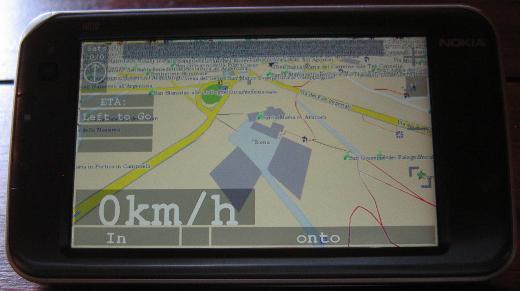
The Nokia N810 with its internal GPS is a device that should fit well for navigation purposes. Below you can see it running navit. In my opinion this is the best available navigation software for the N810. Navit is the main reason for me for wanting the GPS unit in the N810 to be reliable. Get the svn version from here: Gerrit’s Techie Stuff. Some hints on getting navit to run on the N810 can be found on wiki.navit-project.org.

N810 running Navit

N810 running Navit

Sadly the internal GPS unit of the N810 is known to be very problematic and occasionally hardly gets a fix. The suspect seems to be the gpsdriver. It writes i.e. the almanac data to /var/lib/gps/nvd_data. This file seems to be corrupt sometimes when the gpsdriver writes it. Probably the problem occurs when the GPS unit has no fix. The bug entry on this topic on bugs.maemo.org inspired me to write a small wrapper script for the gpsd that copies a backup to /var/lib/gps/nvd_data and watches the gps-daemon. When the GPS unit has a fix it creates a new backup copy of the nvd_data file for later use. Since I use the script, acquiring a GPS fix never took me more than five minutes anymore (without AGPS, with AGPS it is faster, of course).

If you also want to give my script a try, install bash via program manager and download my script from here: gpsd wrapper script for n810 (2900 downloads )

The most convenient way to get the script to the n810 and to perform the necessary changes is to log into the tablet using ssh. How to get ssh to run on your internet tablet is described here: internettabletblog

Log into your tablet using ssh and rename the original gpsd.

-sh-3.2# mv /usr/sbin/gpsd /usr/sbin/gpsd.orig

Then copy my script to the tablet (replace XXX.XXX.XXX.XXX with the ip of your tablet):

scp gpsd root@XXX.XXX.XXX.XXX:/usr/sbin/

Afterwards fix the permissions of the script on the tablet:

-sh-3.2# chmod a+rx /usr/sbin/gpsd

That’s all, now you should have a much better working GPS unit in your N810. Since I only have one device to test this on, please leave a comment if this also worked for you.

regards

Jürgen

1 Star2 Stars3 Stars4 Stars5 Stars (No Ratings Yet)
Loading...

util-vserver-0.30.216_pre2841 vserver startup fails

A while ago during regular upgrades my gentoo box serving as test environment for vservers updated to util-vserver-0.30.216_pre2841. Some weeks later, when I restarted the box I recognized that it could not start any vserver:

# vserver ubuntu start
vcontext: pivot_root(): Invalid argument

An error occured while executing the vserver startup sequence; when
there are no other messages, it is very likely that the init-script
(/etc/init.d/rc 3) failed.

Common causes are:
* /etc/rc.d/rc on Fedora Core 1 and RH9 fails always; the ‘apt-rpm’ build
method knows how to deal with this, but on existing installations,
appending ‘true’ to this file will help.

The box is running vserver-sources kernel 2.6.28-vs2.3.0.36.4-gentoo #2 SMP.

Since I did not find any useful information regarding his error in the web I tried downgrading to util-vserver-0.30.215-r3. For gentoo users this is accomplished by including

>sys-cluster/util-vserver-0.30.215-r3

in /etc/portage/package.mask. Afterwards everything reverted to normality.

If you also experience the “pivot_root(): Invalid argument” error, try downgrading util-vserver and hope for the best 😉

regards

Jürgen

1 Star2 Stars3 Stars4 Stars5 Stars (No Ratings Yet)
Loading...

java3d ebuild for gentoo

The java3d ebuilds in the gentoo portage tree are very outdated, and didn’t even work for me anymore. So I wanted to install a newer version of java3d. This resulted in the updated ebuild you can download from here:

sun-java3d-bin-1.5.2.ebuild (2748 downloads )

I tried the ebuild together with sun-jdk-1.6.0.13 on x86_64 gentoo linux, but it schould also work on i586.

To use it just create the directory structure

mkdir -p /usr/local/portage/dev-java/sun-java3d-bin/

and copy the new ebuild to that directory. Then run

ebuild /usr/local/portage/dev-java/sun-java3d-bin/sun-java3d-bin-1.5.2.ebuild digest

Be sure to include the following line in your /etc/make.conf:

PORTDIR_OVERLAY=”/usr/local/portage”

Then just emerge sun-java3d.

emerge /usr/local/portage/dev-java/sun-java3d-bin/sun-java3d-bin-1.5.2.ebuild

The ebuild creates some symlinks in your VM’s directory, so if you switch the browser plugin or the entire VM you have to reemerge sun-java3d-bin. To have the library ready to use you also have to add the following lines to your /etc/profile:

if [ “$CLASSPATH” = “” ] ; then
CLASSPATH=”/usr/share/sun-java3d-bin/lib/vecmath.jar:/usr/share/sun-java3d-bin/lib/j3dutils.jar:/usr/share/sun-java3d-bin/lib/j3dcore.jar”
else
CLASSPATH=”${CLASSPATH}:/usr/share/sun-java3d-bin/lib/vecmath.jar:/usr/share/sun-java3d-bin/lib/j3dutils.jar:/usr/share/sun-java3d-bin/lib/j3dcore.jar”
fi
export CLASSPATH

if [ “$LD_LIBRARY_PATH” = “” ] ; then
LD_LIBRARY_PATH=”/usr/lib/sun-java3d-bin/”
else
LD_LIBRARY_PATH=”${LD_LIBRARY_PATH}:/usr/lib/sun-java3d-bin/”
fi
export LD_LIBRARY_PATH

To have the changes in effect logout and login again.

If you want to have java3d useable in firefox you have to modify the line:

export LD_LIBRARY_PATH=”/usr/lib64/mozilla-firefox”

in your /usr/bin/firefox to:

export LD_LIBRARY_PATH=”/usr/lib64/mozilla-firefox”:$LD_LIBRARY_PATH

Otherwise you will end up getting unstatisfied link errors since the j3d library cannot be loaded.

Finally you can test if your java3d works on Testseite für Java und Java3D – VS-C. If you are working in a multiheaded environment, this java3d version may only work on the first display. So, if you experience problems just place your browser on the first head.

Have Fun

Jürgen

1 Star2 Stars3 Stars4 Stars5 Stars (No Ratings Yet)
Loading...

osgocean ebuild for gentoo

I just recognized the osgocean release on the osg mailing-list. Osgocean is a library that one can use to render water effects in a very realistic way. It was used to generate the above and below water effects in the VENUS project. For more information on the osgocean project see: osgocean You can see how realistic it looks if you watch the youtube video below.

It looked very interesting, so I decided to try it out. To do so I wrote two ebuilds, one for osgocean and one for  fftss, the fast fourier transformation library it depends on. Both are available in following archive: osgocean overlay (4364 downloads )

Extract the archive to your portage overlay.

# mkdir /usr/local/portage/
# cd /usr/local/portage/
# unzip osgocean_overlay.zip

Be sure that PORTDIR_OVERLAY=”/usr/local/portage” is included in your /etc/make.conf, then you can emerge it:

#emerge osgocean

For this you need to have the OpenSceneGraph library installed. Detailed Instructions on how to build OpenSceneGraph on gentoo can be found on PlopByte.

Since openscenegraph is now in the main portage tree I have updated the ebuild dependencies today (31/08/2009) to either media-gfx/openscenegraph or dev-games/openscenegraph.

Updated ebuild is now available here: osgocean-1.0.1.ebuild (3790 downloads ) Just copy it to /usr/local/portage/media-gfx/osgocean/ after extractingosgocean_overlay.zip like described before and run:

ebuild /usr/local/portage/media-gfx/osgocean/osgocean-1.0.1.ebuild digest

Best regards

Jürgen

1 Star2 Stars3 Stars4 Stars5 Stars (1 votes, average: 5.00 out of 5)
Loading...

check cd/dvd script

I sometimes have the problem that k3b fails to compare a burned disc with an ISO-image because it fails to reload the disk. So I wrote a small script that compares a CD or DVD against an ISO-Image. Since it can be quite handy, I like to share the script with you.

It takes the ISO-image to compare against as first parameter. The second (optional) parameter it takes is the drive, the disc is located in (i.e. /dev/sr0). Commands it needs and that therefore need to be installed on your system are awk, md5sum and pv. Chances are good, that there exist precompiled packages for your distribution. When the comparison is done it prints out whether it succeeded or not and returns 0 on success and   -1 on failure for use from within other programs.

You may download the script from here:

checkdisc.sh (1965 downloads ) gplv3-127x51

Jürgen

1 Star2 Stars3 Stars4 Stars5 Stars (No Ratings Yet)
Loading...

upgrade experiences with nvidia-drivers-180.51

Today, during my regular upgrades, I upgraded my gentoo boxes to nvidia-drivers-180.51, which is the latest version in portage. Since the error in dmesg

bluetooth-apple[10079] general protection ip:7fec32b2cebe sp:7fff3dc7ff00 error:
0 in libGL.so.180.51[7fec32ad6000+a5000]

I mentioned in CTRL-C and CTRL-Z not working after nvidia-driver upgrade and high CPU usage and saw in later releases still occurs and therefore I expect more problems, I downgraded to nvidia-drivers-180.29 again.  Since I upgraded  to xorg-server-1.5.3 in the meanwhile, I am sure now, that the problems are not related to incompatibilities with the older xorg release I ran before.

Did anyone monitor the driver release any closer? How were your experiences?

Jürgen

1 Star2 Stars3 Stars4 Stars5 Stars (No Ratings Yet)
Loading...

siteinfo

Translator