Last year I published the first version of my linux headtracking driver for the VR920 HMD here. Currently I am working on a new driver version which will have the following additional features:
Multiple Protocols: -UDP multicast (as before) -UDP unicast (for flightgear connection and perhaps more) -mouse emulation (via uinput) -joystick emulation (via uinput) -character device for direct angle readings (via cuse, will require a kernel >= 2.6.31)
Inverting of axes (to have moving the head up making the mouse pointer up or down, depending on needs)
Scaling of data (i.e. to match screen size with mouse mode)
Customisable delay between sensor readings
User interface separated from the driver
With the upcoming MPX and the mouse emulation it should be possible to control the visible viewport by turning around the head. Controlling the view for games or other software that do not natively support headtracking should also be possible with the emulation.
In the current development stage most of the features are basically working so expect the new driver to be released soon.
One year ago I provided a gentoo ebuild for mplayer which included support for quad-buffered stereo, enabling mplayer to display stereoscopic movies like the great movie Avatar3D I watched in cinema today. To learn more about the movie look here and here. Sadly the patch I referenced there does not apply over newer mplayer versions. So I had to modify the original patch from Stuart Levy to work again with newer mplayer versions. You may download the updated patch from here:
The patch should work at least with nvidia quadro boards, probably with some others. It can be used with CRT and generic shutter glasses or HMDs like the Vusix VR920. Some stereoscopic sample movies for trying it out can be found on www.3d.wep.dk.
For Gentoo users I also modified the mplayer ebuild from portage to include the patch. The modified ebuild is available here:
To use the ebuild it just copy it to /usr/local/portage/media-video/mplayer and copy the the patch to the “/usr/local/portage/media-video/mplayer/files” directory. You probably have to create these directories. Then run
I’m proud to present a new version of SIV, the stereoscopic jps viewer for Linux I published first in SIV – a stereoscopic jps viewer for Linux. SIV is capable of displaying jps stereo images in different stereo modes. I tried it in fullscreen/windowed mode with anaglyphic and quad buffered stereo mode. Different output devices I tested were my Vuzix VR920 and relevator shutter glasses on Nvidia Quadro FX 350M and FX 3400. It should also work with an Ati FireGL, but I never tried this. The new version fixes some segfaults, that occured when needed libraries were missing. Furthermore I added a slideshow mode and the possibility to specify a default distance and therefore the possibility to set a default zoom factor. The coolest feature I added to the viewer is the headtracking support for the Vuzix VR920 HMD. For this you will need (in addition to the device 😉 ) the headtracking driver, I published in VR920 headtracking driver for Linux. You may watch a video (demo_siv_headtracking_vr920) of me using the viewer with enabled headtracking to view some photos of NASA’s Apollo missions downloadable from nvidia forums.
Usage changes:
New commandline options are:
-s Enable slideshow mode
-t delay Delay for slideshow mode, defaults to 10 sec
-d distance (values between 0.0 and 1.0 are senseful)
These new options control the new headtracking support:
–vr920 enable headtracking support for the vuzix vr920 hmd
-m non default multicast ip
-p non default multicast port
For detailed information on the -m and -p options see the article about the headtracking driver : VR920 headtracking driver for Linux. They have the corresponding meaning. If you want to try out the headtracking, enable the headtracking support with the –vr920 option. You may want to specify the distance to the image with the -d option. Values between 0.25 and 0.5 seem to have a nice effect when using the headtracking. When headtracking is active you may press Z to set the zero view so that with your current head position you will see the center of the image. If you want to manipulate the view manually press 2 to enable the trackball manipulator and use i.e. the right moue button and up or down movements (with the mouse) to control the distance (zoom in or out). Afterwards press 1 to activate headtracking again.
I decided to publish the viewer under the creative common noncommercial license. Make sure you have the OpenSceneGraph library installed before trying to compile or run the viewer. You may download the full source (Eclipse Project) from here:
. More binary formats may be available in the future. Fore the x86_64 binary you’ll need OpenSceneGraph-2.8.
Binaries for most linux distributions can be downloaded from www.openscenegraph.org. Instructions on how to build OpenSceneGraph on gentoo can be found on PlopByte.
Building from source:
For building from source unpack the zip and cd to siv/Release and run make.
Footnote:
If you like the viewer, feel free to link to www.mygnu.de. To request commercial licenses contact us at info(at)mygnu.de. Well, if you just want to support our work on MyGNU.de use the donate button 😉
I just fixed some bugs and implemented a slideshow mode in SIV, the viewer for stereoscopic jps images, I published in SIV – a stereoscopic jps viewer for Linux. As I wrote before in VR920 headtracking driver for Linux I want to extend the viewer using the tracking data from the VR920 HMD, so one can look around the scene by turning his head. Once this work is done you can enjoy a new experience in 3D. So expect the download of a newer version of SIV to appear soon on MyGNU.de.
In the meanwhile you may want to share your experiences with the viewer. What do you like the viewer for? What do you think should be improved?
I made some progress in developing a Linux driver for the Vuzix VR920 iwear headtracking. Thanks to MalMal on Vuzix Forums I was able to learn how to read the Sensor data out of the device via USB. I managed to calculate yaw, pitch and roll from the accelerometer and magnetometer data (The device has got three of each). This makes a 3DOF tracking possible and would allow you to look around in a 3D Scene. Also a use as X11 input device would be possible. One could move the window one sees on a virtual Desktop by turning his head. For this we would need a new X11 input driver which maps the tracking data to the viewport of the virtual screen. How about full HD with 640×480 displays? 😉
The driver sends the tracking data as UDP multicast, thus many clients may read the data, which makes parallelisation more possible, i.e. one could use one machine for rendering and another machine for calculations.
The calibration works similar to the windows driver, one has to turn around the device until no values increase anymore.
I still have to improve the calibration mechanism. It still lacks the set zero feature. Also I have to make movements appear more smooth. Well, these are more or less minor problems and I should solve them soon. So expect to see a download ready version soon on mygnu.de.
Experimenting with my VR920 3D stereo glasses I found a patch to enable stereoscopic support in mplayer (thanks to Stuart Levy). With this patch I can now watch 3D movies on my eyewear under linux. Let me tell you, it’s a really cool experience.
The patch should work at least with nvidia quadro boards, probably with some others. It can also be used with CRT and generic shutter glasses. You can download the patch from here:
To use it just copy the mplayer subtree from the portage tree to /usr/local/portage/media-video/mplayer and remove the ebuilds. Copy the new ebuild to that directory and the patch to the “files” directory. Then run
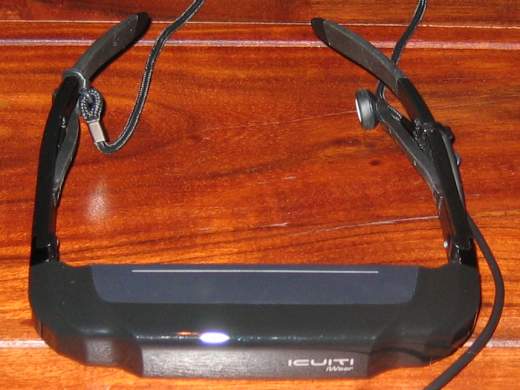
I recently received my VR920 3D stereo glasses from USA. A detailed review of the device can be found here : Introducing the Vuzix iWear VR920. A photo of the VR920 can be seen below:
The device of course works flawlessly using Windows. The situation under Linux is a bit different, due to missing driver support from the manufacturer, as usual.
Stereo vision works at least with nvidia quadro boards, probably also with others. I.e. Ati FireGL should work, but I never tried this. Setting this up was easy. I only had to start a second XServer and add the line
Option “Stereo” “1″
into the screen section of its xorg.conf. With this setting you get a different image for both eyes and thus real stereo vision if your application supports quad-bufferred stereo. It is important that the screen resolution is between 640×480 and 1024×768 and the refresh rate is 60 Hz. The xorg.conf you are using for this must not use the composite extension. For disabling the Composite extension append the following to the xorg.conf:
Sadly this also prevents the use of compiz, hopefully Nvidia fixes the incompatibility between stereo and the composite extension some day.
For starting the xserver i use the following little script, which opens 2 xterms and starts the program (given as parameter with arguments) in one of them.
usb 2-2: new full speed USB device using uhci_hcd and address 8 usb 2-2: configuration #1 chosen from 1 choice generic-usb 0003:1BAE:0002.0002: hiddev0,hidraw1: USB HID v1.00 Device [Icuiti Corp. VR920 Video Eyewear] on usb-0000:00:1d.1-2/input3 usb 2-2: New USB device found, idVendor=1bae, idProduct=0002 usb 2-2: New USB device strings: Mfr=1, Product=2, SerialNumber=0 usb 2-2: Product: VR920 Video Eyewear usb 2-2: Manufacturer: Icuiti Corp. usbcore: registered new interface driver snd-usb-audio
cat /proc/asound/cards:
1 [ Eyewear ]: USB-Audio – VR920 Video Eyewear Icuiti Corp. VR920 Video Eyewear at usb-0000:00:1d.1-2, full speed
I was able to get mplayer to play on the device by setting the output device to hw=1,0 .
Sadly the mixer does not seem to work. At least the mixer levels are not controllable. Perhaps any alsa developer has an idea for this? It is even more important since the mixer control wheel at the device freezes after three steps when using linux.
More important than having controllable sound is to get the integrated headtracking to work. There is a non-working driver at vuzix forums. At least it can read the sensor data from the device but does not seem to handle the data correctly. I will look into this soon.
Playing with the device I had to find out that there is no jps stereoimage viewer for linux. The only programm I found, which is able to read jps-images, is gqview (GQView3D). Sadly gqview is not able to display theese images using active quad-buffered stereo. Thus I decided to write my own jps viewer. It will be based upon OpenSceneGraph (OpenSceneGraph) since I have some experience in OpenSceneGraph development. Perhaps I can integrate headtracking into it. Would be really cool to view a sea panorama image in 3D by turning the head
 MyGNU.de




![[Valid RSS]](https://validator.w3.org/feed/images/valid-rss.png "Validate my RSS feed")


