As promised in JPS-viewer for linux, here comes the very first release of SIV, the first available Stereoscopic Image Viewer for Linux supporting quad buffered stereo. Well this is not 100% correct, since it is build upon OpenSceneGraph it is somewhat platform independant and schould compile well on windows, mac and unix platforms. However, I only tried with linux since there are enough alternatives available for most other platforms.
SIV is capable of displaying jps stereo images in different stereo modes. I tried it in fullscreen/windowed mode with anaglyphic and quad buffered stereo mode. Different output devices I tested were my Vuzix VR920 and relevator shutter glasses on Nvidia Quadro FX 350M and FX 3400. It still lacks some convenience functions like a diashow mode.
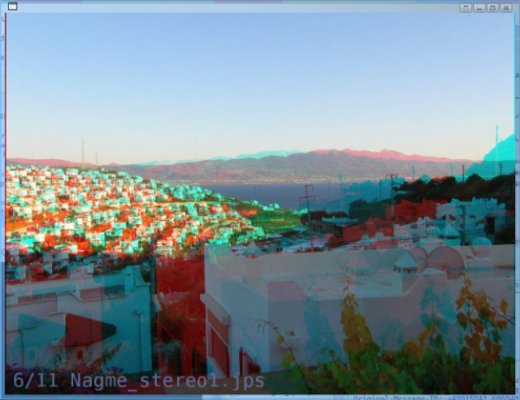
Screenshot of the viewer as window in anaglyphic mode:
A note about the name SIV, SIV stands for Stereoscopic Image Viewer, but as I found out Siv is also the name of the wife of the god Thor in the norse mythology. See: Wikipedia: Sif and Behindthename: Siv. Sif and Siv are the same name, both writings are possible. Once I found out this, I thought that’s a cool name for this piece of work.
Usage:
./siv [options] jpsfile(s)
Options:
–CullDrawThreadPerContext Select CullDrawThreadPerContext
threading model for viewer.
–CullThreadPerCameraDrawThreadPerContext Select
CullThreadPerCameraDrawThreadPerCo-
ntext threading model for viewer.
–DrawThreadPerContext Select DrawThreadPerContext
threading model for viewer.
–SingleThreaded Select SingleThreaded threading
model for viewer.
–accum-rgb Request a rgb accumulator buffer
visual
–accum-rgba Request a rgb accumulator buffer
visual
–cc Request use of compile contexts and
threads
–clear-color <color> Set the background color of the
viewer in the form “r,g,b[,a]”.
–display <type> MONITOR | POWERWALL |
REALITY_CENTER |
HEAD_MOUNTED_DISPLAY
–rgba Request a RGBA color buffer visual
–samples <num> Request a multisample visual
–screen <num> Set the screen to use when multiple
screens are present.
–serialize-draw <mode> OFF | ON – set the serialization of
draw dispatch
–stencil Request a stencil buffer visual
–stereo Use default stereo mode which is
ANAGLYPHIC if not overriden by
environmental variable
–stereo <mode> ANAGLYPHIC | QUAD_BUFFER |
HORIZONTAL_SPLIT | VERTICAL_SPLIT |
LEFT_EYE | RIGHT_EYE |
HORIZONTAL_INTERLACE |
VERTICAL_INTERLACE | CHECKERBOARD |
ON | OFF
–window <x y w h> Set the position (x,y) and size
(w,h) of the viewer window.
-O <option_string> Provide an option string to
reader/writers used to load
databases
-e <extension> Load the plugin associated with
handling files with specified
extension
-h or –help Display this information
-l <library> Load the plugin
You may notice that most of the options come from osgViewer, which is the base class for the viewer. This gives the advantage, that one can use the “normal” osgViewer controls such as flying around the scene. Try holding the right mouse button and moving the mouse up or down for zooming out or in. Or press F for toggling fullscreen mode or press S for toggling the stats (fps, etc.) display.
You may supply multiple .jps files at the command line. I.e. ./siv *.jps will display all jps files in the current folder 😉
Once the first image of the list is being displayed you may use CURSOR_UP/DOWN or the mouse wheel to select a different image for being displayed. In future versions I may implement a diashow function…
When displaying an image the filename of the image is displayed in the lower left corner.
You can find some jps images for trying out the viewer on: Stereo Images From Juneau.
Possible Problems:
As default SIF starts in fullscreen quad buffered stereo mode. Thus if your graphics hardware does not support this mode, the viewer will exit with the following error:
Error: Not able to create requested visual.
GraphicsWindow has not been created successfully.
Viewer::realize() – failed to set up any windows
In this case try anaglyphic mode or the apropiate 3D mode for your hardware (see the –stereo option).
You may experience the application segfaulting. Most possibly the reason is that your OpenSceneGraph lacks the library osgdb_jp2.so in the lib/osgPlugins folder. If you strace the application and the last thing it tries before segfaulting is to access osgdb_jp2.so, this is the reason. The Problem will be corrected in the next version of SIV. For now install Jasper and rebuild OpenSceneGraph.
Download: 

Do not download these files anymore unless you explicitely want this version. New version is available at: SIV-1.0 released
I decided to publish the viewer under the creative common noncommercial license. Make sure you have the OpenScenegraph library installed before trying to compile or run the viewer. You may download the full source (Eclipse Project) from here:
or an x86_64 binary from here:
. More binary formats may be available in the future. Fore the x86_64 binary you’ll need OpenSceneGraph-2.8.
Binaries for most linux distributions can be downloaded from www.openscenegraph.org. Instructions on how to build OpenSceneGraph on gentoo can be found on PlopByte.
Building from source:
For building from source unpack the zip and cd to siv/Release and run make.
Future plans:
For the future I’d like to implement a diashow function and to integrate the VR920 headtracking into the viewer. It would be really cool to view a sea panorama image in 3D by turning the head  This is the reason why the image is not being displayed plain, but on a cylinder segment. For the tracking I’ll have to write a driver for the VR920 headtracking first, to get the camera viewmatrix for the viewer. Since in Vuzix Forums I found a non working driver, from which I was able to learn how to read the sensor data, I only have to implement the neccesary calculations and calibration methods.
Well, I hope you enjoy the 3rd dimension. If you like the viewer feel free to link to MyGNU.de.
Stay tuned for updates
Jürgen

Loading...
Posted in 3d, graphics, linux | 27 Comments »
 MyGNU.de


![[Valid RSS]](https://validator.w3.org/feed/images/valid-rss.png "Validate my RSS feed")


