For one of our projects I had to write a simple program, for importing items into our online store (watercoolshop.de). When I finished the coding everything seemed to run smooth, but only on Windows. Afterwards I tested the program on my linux box and it did not work.
After checking all files I found out that the encoding of the files was wrong for importing into our shop. With the help of google and some other sites the problem was solved. I had to use ISO-8859-1 for all files, because the core data is 8859.
To read a file I use the following code now:
BufferedReader in = new BufferedReader(new InputStreamReader(connection.getInputStream(),”ISO-8859-1″));
and to write:
Writer bw = new BufferedWriter(new OutputStreamWriter(new FileOutputStream(fileName), “ISO-8859-1”));
I hope this will help someone who has a similar problem.
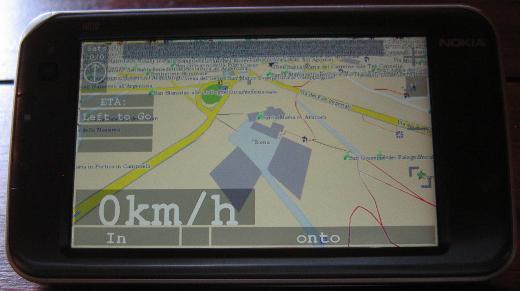
The Nokia N810 with its internal GPS is a device that should fit well for navigation purposes. Below you can see it running navit. In my opinion this is the best available navigation software for the N810. Navit is the main reason for me for wanting the GPS unit in the N810 to be reliable. Get the svn version from here: Gerrit’s Techie Stuff. Some hints on getting navit to run on the N810 can be found on wiki.navit-project.org.
N810 running Navit
Sadly the internal GPS unit of the N810 is known to be very problematic and occasionally hardly gets a fix. The suspect seems to be the gpsdriver. It writes i.e. the almanac data to /var/lib/gps/nvd_data. This file seems to be corrupt sometimes when the gpsdriver writes it. Probably the problem occurs when the GPS unit has no fix. The bug entry on this topic on bugs.maemo.org inspired me to write a small wrapper script for the gpsd that copies a backup to /var/lib/gps/nvd_data and watches the gps-daemon. When the GPS unit has a fix it creates a new backup copy of the nvd_data file for later use. Since I use the script, acquiring a GPS fix never took me more than five minutes anymore (without AGPS, with AGPS it is faster, of course).
If you also want to give my script a try, install bash via program manager and download my script from here:
The most convenient way to get the script to the n810 and to perform the necessary changes is to log into the tablet using ssh. How to get ssh to run on your internet tablet is described here: internettabletblog
Log into your tablet using ssh and rename the original gpsd.
-sh-3.2# mv /usr/sbin/gpsd /usr/sbin/gpsd.orig
Then copy my script to the tablet (replace XXX.XXX.XXX.XXX with the ip of your tablet):
scp gpsd root@XXX.XXX.XXX.XXX:/usr/sbin/
Afterwards fix the permissions of the script on the tablet:
-sh-3.2# chmod a+rx /usr/sbin/gpsd
That’s all, now you should have a much better working GPS unit in your N810. Since I only have one device to test this on, please leave a comment if this also worked for you.
A while ago during regular upgrades my gentoo box serving as test environment for vservers updated to util-vserver-0.30.216_pre2841. Some weeks later, when I restarted the box I recognized that it could not start any vserver:
An error occured while executing the vserver startup sequence; when there are no other messages, it is very likely that the init-script (/etc/init.d/rc 3) failed.
Common causes are: * /etc/rc.d/rc on Fedora Core 1 and RH9 fails always; the ‘apt-rpm’ build method knows how to deal with this, but on existing installations, appending ‘true’ to this file will help.
The box is running vserver-sources kernel 2.6.28-vs2.3.0.36.4-gentoo #2 SMP.
Since I did not find any useful information regarding his error in the web I tried downgrading to util-vserver-0.30.215-r3. For gentoo users this is accomplished by including
>sys-cluster/util-vserver-0.30.215-r3
in /etc/portage/package.mask. Afterwards everything reverted to normality.
If you also experience the “pivot_root(): Invalid argument” error, try downgrading util-vserver and hope for the best 😉
The java3d ebuilds in the gentoo portage tree are very outdated, and didn’t even work for me anymore. So I wanted to install a newer version of java3d. This resulted in the updated ebuild you can download from here:
The ebuild creates some symlinks in your VM’s directory, so if you switch the browser plugin or the entire VM you have to reemerge sun-java3d-bin. To have the library ready to use you also have to add the following lines to your /etc/profile:
if [ “$CLASSPATH” = “” ] ; then CLASSPATH=”/usr/share/sun-java3d-bin/lib/vecmath.jar:/usr/share/sun-java3d-bin/lib/j3dutils.jar:/usr/share/sun-java3d-bin/lib/j3dcore.jar” else CLASSPATH=”${CLASSPATH}:/usr/share/sun-java3d-bin/lib/vecmath.jar:/usr/share/sun-java3d-bin/lib/j3dutils.jar:/usr/share/sun-java3d-bin/lib/j3dcore.jar” fi export CLASSPATH
if [ “$LD_LIBRARY_PATH” = “” ] ; then LD_LIBRARY_PATH=”/usr/lib/sun-java3d-bin/” else LD_LIBRARY_PATH=”${LD_LIBRARY_PATH}:/usr/lib/sun-java3d-bin/” fi export LD_LIBRARY_PATH
To have the changes in effect logout and login again.
If you want to have java3d useable in firefox you have to modify the line:
Otherwise you will end up getting unstatisfied link errors since the j3d library cannot be loaded.
Finally you can test if your java3d works on Testseite für Java und Java3D – VS-C. If you are working in a multiheaded environment, this java3d version may only work on the first display. So, if you experience problems just place your browser on the first head.
I just recognized the osgocean release on the osg mailing-list. Osgocean is a library that one can use to render water effects in a very realistic way. It was used to generate the above and below water effects in the VENUS project. For more information on the osgocean project see: osgocean You can see how realistic it looks if you watch the youtube video below.
It looked very interesting, so I decided to try it out. To do so I wrote two ebuilds, one for osgocean and one for fftss, the fast fourier transformation library it depends on. Both are available in following archive:
# mkdir /usr/local/portage/ # cd /usr/local/portage/ # unzip osgocean_overlay.zip
Be sure that PORTDIR_OVERLAY=”/usr/local/portage” is included in your /etc/make.conf, then you can emerge it:
#emerge osgocean
For this you need to have the OpenSceneGraph library installed. Detailed Instructions on how to build OpenSceneGraph on gentoo can be found on PlopByte.
Since openscenegraph is now in the main portage tree I have updated the ebuild dependencies today (31/08/2009) to either media-gfx/openscenegraph or dev-games/openscenegraph.
As you can read here 2.6.30 is out now. As to the whole set of changes since 2.6.29, the best place to look is probably just http://kernelnewbies.org/Linux_2_6_30 as usual. One thing that doesn’t seem to be mentioned here is that we’re hopefully now done with the suspend/resume irq re-architecting, and have switched to a new world order. Although I suspect lots of details will still change, of course.
If we have tested the new kernel, probably with zen patch set, we will tell you
After I have tested the nvidia-drivers-185.18.08 beta I searched the web for a new one and I found it yesterday on nvnews.net. This version seems to run well on my Dell M4300. For all using Gentoo I made an ebuild:
# mkdir /usr/local/portage/ # cd /usr/local/portage/ # tar -xpvf nv-portage.tar
Be sure that PORTDIR_OVERLAY=”/usr/local/portage” is in your /etc/make.conf, then you can emerge it: # ACCEPT_KEYWORDS=”~amd64″ emerge =nvidia-drivers-180.60 -1
 MyGNU.de

![[Valid RSS]](https://validator.w3.org/feed/images/valid-rss.png "Validate my RSS feed")


