Ok, there’s just a few final commits since -rc9 to fix a couple of last regressions and problems, and now the final 2.6.31 is out there. The small diffstat and shortlog is below, the full log and diff from 2.6.30 are being uploaded to kernel.org (and then mirrored out) as I write this. In general, the full set of 2.6.30->31 changes are too numerous to list, but as usual, you’ll find some high-level overviews on kernelnewbies.org. read more
We will inform you if zen-sources are avaiable and running.
Today I patched the brand new zen-sources-2.6.30-r4 with tuxonice. This was necessary since I need tuxonice on my notebook for suspend modes and tuxonice has been removed permanently from zen-sources. Suspend to RAM works at least on my Dell Precison M65 as well as suspend to disk does.
I recommend using this version over using the r3-version, because it fixes the root exploit vulnerability mentioned on www.linux-magazine.com.
and extract it in /usr/local/portage. Be sure to include the following line in your /etc/make.conf:
PORTDIR_OVERLAY="/usr/local/portage"
Then emerge zen-sources-toi and buld the kernel as you wish.
To work around the black screen problem with some nvidia-drivers versions, discussed at gentoo forums, I had to upgrade to nvidia-drivers-190.18. Strangely the issue does only occur on my Precision M65 with a Quadro FX350M. It does not occur with the Quadro FX3400 in my Desktop PC, Nvidia-drivers-185.18.31 are running there without any problems.
Tuxonice is not officially supported in zen-sources. So If you’re using the files above, don’t report any bugs to zen-sources.org. You are on your own.
For my Precision M65 I used the following kernel config:
If you want to use all channels with the iwl3945 driver change the line
static char *ieee80211_regdom = “US”;
to
static char *ieee80211_regdom = “JP”;
in the file net/wireless/reg.c.
If you are using this kernel on a notebook with i.e. a Core2 CPU you might be interesting to undervolt your CPU to save power and to produce less heat (keeps the fan off longer). This works like a charm on my M65. Information on this topic can be found here: aldeby.org. The linux-pch patch mentioned there is already included in zen-sources, thus you only have to perform the userspace part begnning at (3).
Today I managed to patch the brand new zen-sources-2.6.30-r3 with tuxonice. This was necessary since I need tuxonice on my notebook for suspend modes and tuxonice has been removed permanently from zen-sources. Suspend to RAM works at least on my Dell Precison M65 as well as suspend to disk does.
and extract it in /usr/local/portage. Be sure to include the following line in your /etc/make.conf:
PORTDIR_OVERLAY="/usr/local/portage"
Then emerge zen-sources-toi and continue with building the kernel as you wish.
To work around the black screen problem with some nvidia-drivers versions, discussed at gentoo forums, I had to upgrade to nvidia-drivers-190.18. Strangely the issue does only occur on my Precision M65 with a Quadro FX350M. It does not occur with the Quadro FX3400 in my Desktop PC, Nvidia-drivers-185.18.31 are running there without any problems.
Tuxonice is not officially supported in zen-sources. So If you’re using the files above, don’t report any bugs to zen-sources.org. You are on your own.
For my Precision M65 I used the following kernel config:
Today, when I tried to sync the portage overlays on my gentoo linux boxes, I got the error:
ImportError: No module named layman.config
The recent update from python-2.5 to python-2.6 has broken several applications. This issue was solved by running python-updater, which re-emerges all broken python packages. Besides from layman not working, the python upgrade may cause several other problems in portage and in the whole system. Thus just be sure to run python-updater after the python-upgrade.
For one of our projects I had to write a simple program, for importing items into our online store (watercoolshop.de). When I finished the coding everything seemed to run smooth, but only on Windows. Afterwards I tested the program on my linux box and it did not work.
After checking all files I found out that the encoding of the files was wrong for importing into our shop. With the help of google and some other sites the problem was solved. I had to use ISO-8859-1 for all files, because the core data is 8859.
To read a file I use the following code now:
BufferedReader in = new BufferedReader(new InputStreamReader(connection.getInputStream(),”ISO-8859-1″));
and to write:
Writer bw = new BufferedWriter(new OutputStreamWriter(new FileOutputStream(fileName), “ISO-8859-1”));
I hope this will help someone who has a similar problem.
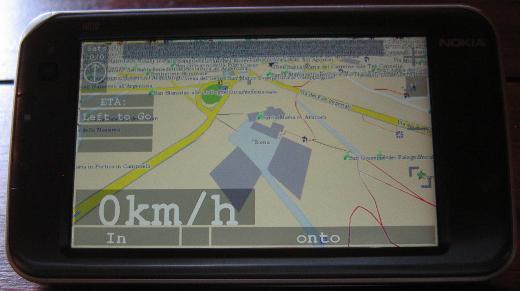
The Nokia N810 with its internal GPS is a device that should fit well for navigation purposes. Below you can see it running navit. In my opinion this is the best available navigation software for the N810. Navit is the main reason for me for wanting the GPS unit in the N810 to be reliable. Get the svn version from here: Gerrit’s Techie Stuff. Some hints on getting navit to run on the N810 can be found on wiki.navit-project.org.
N810 running Navit
Sadly the internal GPS unit of the N810 is known to be very problematic and occasionally hardly gets a fix. The suspect seems to be the gpsdriver. It writes i.e. the almanac data to /var/lib/gps/nvd_data. This file seems to be corrupt sometimes when the gpsdriver writes it. Probably the problem occurs when the GPS unit has no fix. The bug entry on this topic on bugs.maemo.org inspired me to write a small wrapper script for the gpsd that copies a backup to /var/lib/gps/nvd_data and watches the gps-daemon. When the GPS unit has a fix it creates a new backup copy of the nvd_data file for later use. Since I use the script, acquiring a GPS fix never took me more than five minutes anymore (without AGPS, with AGPS it is faster, of course).
If you also want to give my script a try, install bash via program manager and download my script from here:
The most convenient way to get the script to the n810 and to perform the necessary changes is to log into the tablet using ssh. How to get ssh to run on your internet tablet is described here: internettabletblog
Log into your tablet using ssh and rename the original gpsd.
-sh-3.2# mv /usr/sbin/gpsd /usr/sbin/gpsd.orig
Then copy my script to the tablet (replace XXX.XXX.XXX.XXX with the ip of your tablet):
scp gpsd root@XXX.XXX.XXX.XXX:/usr/sbin/
Afterwards fix the permissions of the script on the tablet:
-sh-3.2# chmod a+rx /usr/sbin/gpsd
That’s all, now you should have a much better working GPS unit in your N810. Since I only have one device to test this on, please leave a comment if this also worked for you.
A while ago during regular upgrades my gentoo box serving as test environment for vservers updated to util-vserver-0.30.216_pre2841. Some weeks later, when I restarted the box I recognized that it could not start any vserver:
An error occured while executing the vserver startup sequence; when there are no other messages, it is very likely that the init-script (/etc/init.d/rc 3) failed.
Common causes are: * /etc/rc.d/rc on Fedora Core 1 and RH9 fails always; the ‘apt-rpm’ build method knows how to deal with this, but on existing installations, appending ‘true’ to this file will help.
The box is running vserver-sources kernel 2.6.28-vs2.3.0.36.4-gentoo #2 SMP.
Since I did not find any useful information regarding his error in the web I tried downgrading to util-vserver-0.30.215-r3. For gentoo users this is accomplished by including
>sys-cluster/util-vserver-0.30.215-r3
in /etc/portage/package.mask. Afterwards everything reverted to normality.
If you also experience the “pivot_root(): Invalid argument” error, try downgrading util-vserver and hope for the best 😉
 MyGNU.de

![[Valid RSS]](https://validator.w3.org/feed/images/valid-rss.png "Validate my RSS feed")


