Recently I wrote about bino, a stereoscopic video player that is usable with linux and also supports quad buffered stereo. In the meanwhile the versions 0.9.1 and 0.9.2 have been released. The new version includes multithreading to read, decode, and display video data in parallel, for better performance and some bugfixes.
Bino still does not work properly with linux, at least it still does not display anything on my gentoo box. The patch for bino, I provided here, does not work anymore.
Problems
At least on my gentoo box bino failed to display anything. When starting bino it failed with a window popping up:
Cannot set GL context format
The reason for this was the same as before. Bino was requesting an alpha visual, which did not succeed. I have not seen the point in requiring an alpha visual for bino, so I just removed this. You may download the patch from here:
Addon: The patch is only necessary when the X server does not provide an alpha visual, which may i.e. be the case when using only 16 bits of colour depth.
Download the modified overlay (it includes the patches) and extract it in /usr/local/portage. Be sure to include the following line in your /etc/make.conf:
PORTDIR_OVERLAY=”/usr/local/portage”
Then emerge bino and enjoy viewing your 3d movies again.
One year ago I provided a patch for mplayer which included support for quad-buffered stereo, enabling mplayer to display stereoscopic movies. In the meanwhile mplayer-1.0_rc4_p20101114 arrived in portage. As before with the original patch from Stuart Levy, my one does not work anymore due to some changes in mplayers gl2 driver. So I had to modify the patch again to work again with newer mplayer versions. You may download the updated patch from here:
The patch should work at least with nvidia quadro boards, probably with some others. It can be used with CRT and generic shutter glasses or HMDs like the Vusix VR920. Some stereoscopic sample movies for trying it out can be found on www.3d.wep.dk.
The Gentoo way
For Gentoo users I again modified the mplayer ebuild from portage to include the patch. The modified ebuild is available here:
The older ebuild and patch are still available on mygnu.de.
To use the ebuild it just copy it to /usr/local/portage/media-video/mplayer and copy the the patch to the “/usr/local/portage/media-video/mplayer/files” directory. You probably have to create these directories. Then run
Last year I wrote about bino, a stereoscopic video player that is usable with linux and also supports quad buffered stereo. In the meanwhile the versions 0.8 and 0.8.1 have been released. Thanks for your work, Martin. The new versions contain some bug fixes and the following new features:
Adjustable ghostbusting to reduce crosstalk artifacts.
Parallax adjustment.
Mouse-based seeking.
Initial support for choosing an audio stream.
Improved compatibility with many video types.
Bino still does not work properly with linux, at least it does not display anything on my gentoo box. The good news is that my patch for bino, I provided here, still works.
The Gentoo way
For gentoo users here is my overlay including the ebuild:
A while ago I updated the stereocopic mplayer patch to work again with newer mplayer versions. This patch worked to display side by side stereo movies in quad buffered stereo mode but it did not enable mplayer to display stereo videos consisting of two separate video streams for the right and the left eye like those produced with Fujifilm Real 3D cameras. A player capable of displaying these files and many other stereoscopic movie formats is bino. I recognized that bino is also capable of displaying a single video stream in quad buffered stereo mode. For a future version it would be really nice to have it calculating a 3D version of the stream on the fly and displaying this fake stereo video. There are some algorithms known that are capable of doing this calculation. It should be possible to do this in parallel on the GPU, so processing power should not be the problem… Of course such a fake stereo video cannot have the quality of a real stereo one, but it may be the only possibility to watch ones favorite movie in stereo.
Problems
At least on my gentoo box bino failed to display anything. When requesting quad buffered stereo (bino -o stereo) it failed with:
bino: [err] display does not support stereo mode
When trying to start bino without quad buffered stereo it failed with:
bino: [err] cannot set GL context format
The reason for this was found quickly. Bino was requesting an alpha visual, which did not succeed. I have not seen the point in requiring an alpha visual for bino, so I just removed this. You may download the patch from here:
Download the modified overlay (it includes the patch) and extract it in /usr/local/portage. Be sure to include the following line in your /etc/make.conf:
PORTDIR_OVERLAY=”/usr/local/portage”
Then emerge bino and enjoy viewing your 3d movies.
On my x86_64 gentoo box, running gnome and therefore pulseaudio, I experienced the problem that when and after playing some flash videos (i.e. youtube) the sound device was blocked and no other application was able to play sound. After killing the plugin sound worked just normal, but that was no convenient way.
64-bit flash plugin for Firefox
My first suspective was the 32-Bit flash plugin I used in my 64-bit Firefox until now. So I replaced it by the new 64-bit plugin, which did not solve the problem, since it does also not use pulseaudio for playback. But I include the steps for completeness here:
For other linux distributions like Debian, Ubuntu, Redhat or Suse you obviously have to search the appropriate plugin and install it the distribution-specific way. Afterwards you have to remove the 32-bit plugin from nspluginwrapper, which makes 32-bit plugins available for 64-bit firefox:
As I stated before this does not solve the problem, but at least it gives one a 64-bit flash plugin 😉
Make alsa applications use the pulseaudio server
There is a pulseaudio plugin for alsa, which is necessary for playback of alsa sound via the pulseaudio server. So the next step is to install this plugin. For gentoo it is contained in the alsa-plugins package. So for the gentoo way:
emerge alsa-plugins
Afterwards make sure that your /etc/asound.conf contains the following lines:
pcm.pulse { type pulse } ctl.pulse { type pulse } pcm.!default { type pulse } ctl.!default { type pulse }
After restarting alsa everything that is playing sound via alsa now uses pulseaudio via the plugin and the sound device is no more used concurrently. One can playback via pulseaudio after using flash sites or even at the same time. Mission accomplished!
OSS emulation for pulseaudio
Sadly the above only works for applications directly using the alsa sound system. Applications depending on OSS (i.e. all Java Applications), using the kernel layer alsa oss emulation, still block the audio device, so the the kernel layer OSS emulation is a no go with pulseaudio. Include the corresponding modules in /etc/modprobe.d/blacklist.conf or remove the emulation completely from your kernel configuration.
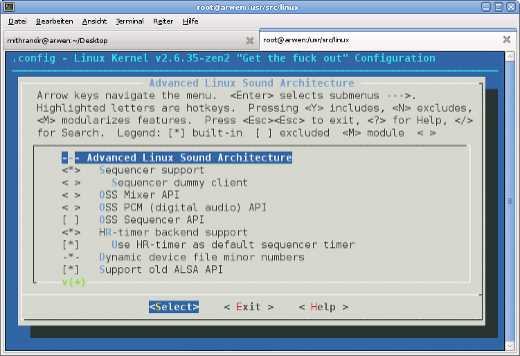
Of course this only shuts off these applications completely but is neccesary for the further steps to work. We´re lucky, we can use a daemon which provides the OSS devices (/dev/dsp, etc.) and links them via fuse to the pulseaudio daemon. For this we need to load the cuse kernel module (add it to /etc/modules.autoload.d/kernel-2.6 and it gets loaded automatically on next reboot) or when not available add the functionality to your kernel configuration and rebuild your kernel.
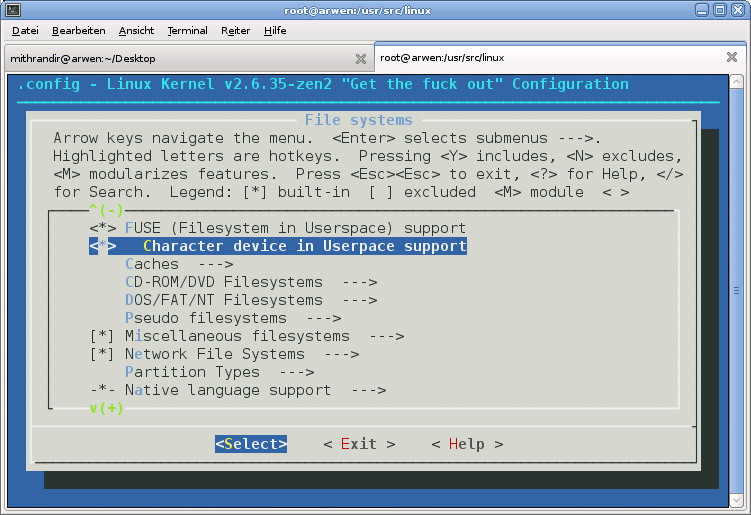
Now we´re ready to install ossp, the daemon I mentioned before. It is available from Sourceforge, probably also in your distributions package repository. For gentoo users, as usual there is a more easy way. I found an ebuild for ossp on gentoo bugzilla, which I got to work with minor modifications. You can download the modified ebuild here:
For having osspd started automatically on every system boot I lazily included it in my /etc/conf.d/local.start.
echo /usr/sbin/osspd >> /etc/conf.d/local.start
Now sound should just work as one expects it to. Different sources can playback at the same time. No blocked devices occur because of concurrency, no matter which sound API the applications use.
One year ago I provided a gentoo ebuild for mplayer which included support for quad-buffered stereo, enabling mplayer to display stereoscopic movies like the great movie Avatar3D I watched in cinema today. To learn more about the movie look here and here. Sadly the patch I referenced there does not apply over newer mplayer versions. So I had to modify the original patch from Stuart Levy to work again with newer mplayer versions. You may download the updated patch from here:
The patch should work at least with nvidia quadro boards, probably with some others. It can be used with CRT and generic shutter glasses or HMDs like the Vusix VR920. Some stereoscopic sample movies for trying it out can be found on www.3d.wep.dk.
For Gentoo users I also modified the mplayer ebuild from portage to include the patch. The modified ebuild is available here:
To use the ebuild it just copy it to /usr/local/portage/media-video/mplayer and copy the the patch to the “/usr/local/portage/media-video/mplayer/files” directory. You probably have to create these directories. Then run
Experimenting with my VR920 3D stereo glasses I found a patch to enable stereoscopic support in mplayer (thanks to Stuart Levy). With this patch I can now watch 3D movies on my eyewear under linux. Let me tell you, it’s a really cool experience.
The patch should work at least with nvidia quadro boards, probably with some others. It can also be used with CRT and generic shutter glasses. You can download the patch from here:
To use it just copy the mplayer subtree from the portage tree to /usr/local/portage/media-video/mplayer and remove the ebuilds. Copy the new ebuild to that directory and the patch to the “files” directory. Then run