Recently we had the task to create an animated web banner containing a marquee (in German Laufschrift) in Linux. Since we were not able to find a piece of software performing this task in an efficient way, I decided to write a small script for this. It uses ImageMagik (in my case V6.4.4.6) to generate an marquee below a supplied image and produces an animated gif as output. The script contains a config section where you may supply the input logo, the marquee text and some further settings like font and color:
# Settings
#the text for the marquee text=”+++ put the text for the marquee here +++ 0111011001101100101100011101010001001001010110010111010101 ”
# files
#input file
logo=logo.gif
#output file
output=text.gif
#background color
background=transparent
# font settings
pointsize=20
font=./Digit.ttf
textcolor=orange
# animation settings
stepsize=6 #if possible this should be a part of the textwidth (see output) #if chosen too small this may result in too large images
delay=10 #speed
Just put in the necessary settings and run the script. You can also use the script on your web-server to update your banners with new text on the fly. You may download the script here:
Experimenting with my VR920 3D stereo glasses I found a patch to enable stereoscopic support in mplayer (thanks to Stuart Levy). With this patch I can now watch 3D movies on my eyewear under linux. Let me tell you, it’s a really cool experience.
The patch should work at least with nvidia quadro boards, probably with some others. It can also be used with CRT and generic shutter glasses. You can download the patch from here:
To use it just copy the mplayer subtree from the portage tree to /usr/local/portage/media-video/mplayer and remove the ebuilds. Copy the new ebuild to that directory and the patch to the “files” directory. Then run
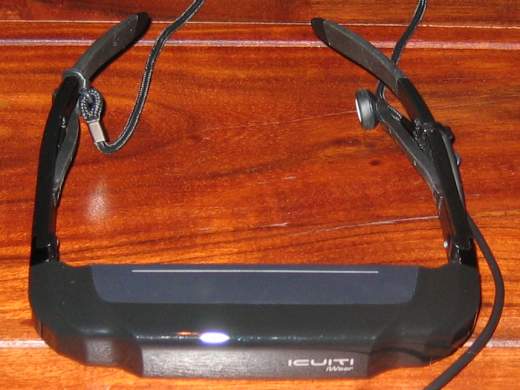
I recently received my VR920 3D stereo glasses from USA. A detailed review of the device can be found here : Introducing the Vuzix iWear VR920. A photo of the VR920 can be seen below:
The device of course works flawlessly using Windows. The situation under Linux is a bit different, due to missing driver support from the manufacturer, as usual.
Stereo vision works at least with nvidia quadro boards, probably also with others. I.e. Ati FireGL should work, but I never tried this. Setting this up was easy. I only had to start a second XServer and add the line
Option “Stereo” “1″
into the screen section of its xorg.conf. With this setting you get a different image for both eyes and thus real stereo vision if your application supports quad-bufferred stereo. It is important that the screen resolution is between 640×480 and 1024×768 and the refresh rate is 60 Hz. The xorg.conf you are using for this must not use the composite extension. For disabling the Composite extension append the following to the xorg.conf:
Sadly this also prevents the use of compiz, hopefully Nvidia fixes the incompatibility between stereo and the composite extension some day.
For starting the xserver i use the following little script, which opens 2 xterms and starts the program (given as parameter with arguments) in one of them.
usb 2-2: new full speed USB device using uhci_hcd and address 8 usb 2-2: configuration #1 chosen from 1 choice generic-usb 0003:1BAE:0002.0002: hiddev0,hidraw1: USB HID v1.00 Device [Icuiti Corp. VR920 Video Eyewear] on usb-0000:00:1d.1-2/input3 usb 2-2: New USB device found, idVendor=1bae, idProduct=0002 usb 2-2: New USB device strings: Mfr=1, Product=2, SerialNumber=0 usb 2-2: Product: VR920 Video Eyewear usb 2-2: Manufacturer: Icuiti Corp. usbcore: registered new interface driver snd-usb-audio
cat /proc/asound/cards:
1 [ Eyewear ]: USB-Audio – VR920 Video Eyewear Icuiti Corp. VR920 Video Eyewear at usb-0000:00:1d.1-2, full speed
I was able to get mplayer to play on the device by setting the output device to hw=1,0 .
Sadly the mixer does not seem to work. At least the mixer levels are not controllable. Perhaps any alsa developer has an idea for this? It is even more important since the mixer control wheel at the device freezes after three steps when using linux.
More important than having controllable sound is to get the integrated headtracking to work. There is a non-working driver at vuzix forums. At least it can read the sensor data from the device but does not seem to handle the data correctly. I will look into this soon.
Playing with the device I had to find out that there is no jps stereoimage viewer for linux. The only programm I found, which is able to read jps-images, is gqview (GQView3D). Sadly gqview is not able to display theese images using active quad-buffered stereo. Thus I decided to write my own jps viewer. It will be based upon OpenSceneGraph (OpenSceneGraph) since I have some experience in OpenSceneGraph development. Perhaps I can integrate headtracking into it. Would be really cool to view a sea panorama image in 3D by turning the head
I’ve updated to zen-sources 2.6.28-zen1 and there is a problem in 2.6.28 with the fingerprint reader (usb) on my notebook. So I searched the web and found a bug report with a patch for these sources. I tried this and will tell you that it works fine for me. I hope this will be soon released.
This blog contains information about GNU (Linux). We are using Gentoo on our Systems and want to share our solutions on mygnu.de. We are Jürgen and Thorsten of main-host.de.
To learn about gnu and linux and the difference have a look at gnu.org.
 MyGNU.de



![[Valid RSS]](https://validator.w3.org/feed/images/valid-rss.png "Validate my RSS feed")


