 MyGNU.de
Vuzix VR920 with Linux and active 3D stereo
I recently received my VR920 3D stereo glasses from USA. A detailed review of the device can be found here : Introducing the Vuzix iWear VR920. A photo of the VR920 can be seen below:
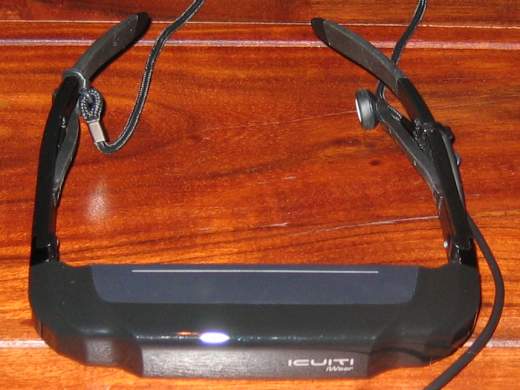
The device of course works flawlessly using Windows. The situation under Linux is a bit different, due to missing driver support from the manufacturer, as usual.
Stereo vision works at least with nvidia quadro boards, probably also with others. I.e. Ati FireGL should work, but I never tried this. Setting this up was easy. I only had to start a second XServer and add the line
Option “Stereo” “1″
into the screen section of its xorg.conf. With this setting you get a different image for both eyes and thus real stereo vision if your application supports quad-bufferred stereo. It is important that the screen resolution is between 640×480 and 1024×768 and the refresh rate is 60 Hz. The xorg.conf you are using for this must not use the composite extension. For disabling the Composite extension append the following to the xorg.conf:
Section “Extensions”
Option “Composite” “Disable”
EndSection
Sadly this also prevents the use of compiz, hopefully Nvidia fixes the incompatibility between stereo and the composite extension some day.
For starting the xserver i use the following little script, which opens 2 xterms and starts the program (given as parameter with arguments) in one of them.
#!/bin/bash
/usr/X11R6/bin/X :1 -dpi 96 -xf86config ./xorg.conf.3d -auth /var/gdm/:1.Xauth vt8 &
DISPLAY=:1.0
export DISPLAY
sleep 5
icewm&
hotkeys&
xterm -fn 9×15&
xterm -fn 9×15 -e $@&
The headphone gets detected as alsa device:
usb 2-2: new full speed USB device using uhci_hcd and address 8
usb 2-2: configuration #1 chosen from 1 choice
generic-usb 0003:1BAE:0002.0002: hiddev0,hidraw1: USB HID v1.00 Device [Icuiti Corp. VR920 Video Eyewear] on usb-0000:00:1d.1-2/input3
usb 2-2: New USB device found, idVendor=1bae, idProduct=0002
usb 2-2: New USB device strings: Mfr=1, Product=2, SerialNumber=0
usb 2-2: Product: VR920 Video Eyewear
usb 2-2: Manufacturer: Icuiti Corp.
usbcore: registered new interface driver snd-usb-audio
cat /proc/asound/cards:
1 [ Eyewear ]: USB-Audio – VR920 Video Eyewear
Icuiti Corp. VR920 Video Eyewear at usb-0000:00:1d.1-2, full speed
I was able to get mplayer to play on the device by setting the output device to hw=1,0 .
Sadly the mixer does not seem to work. At least the mixer levels are not controllable. Perhaps any alsa developer has an idea for this? It is even more important since the mixer control wheel at the device freezes after three steps when using linux.
More important than having controllable sound is to get the integrated headtracking to work. There is a non-working driver at vuzix forums. At least it can read the sensor data from the device but does not seem to handle the data correctly. I will look into this soon.
Update: My VR920 headtracking driver is now available here: VR920 headtracking driver for Linux
Playing with the device I had to find out that there is no jps stereoimage viewer for linux. The only programm I found, which is able to read jps-images, is gqview (GQView3D). Sadly gqview is not able to display theese images using active quad-buffered stereo. Thus I decided to write my own jps viewer. It will be based upon OpenSceneGraph (OpenSceneGraph) since I have some experience in OpenSceneGraph development. Perhaps I can integrate headtracking into it. Would be really cool to view a sea panorama image in 3D by turning the head 
Stay tuned for updates.
Jürgen
 (No Ratings Yet)
 Loading...
![[Valid RSS]](https://validator.w3.org/feed/images/valid-rss.png "Validate my RSS feed")
February 9th, 2009 at 9:51 pm
[…] mplayer und Vusix VR920 with Linux and active 3D stereo […]
February 19th, 2009 at 8:45 pm
[…] I stated before in Vusix VR920 with Linux and active 3D stereo, I planned to write the first stereo enabled jps viewer for linux. At least I was not able to find […]
February 22nd, 2009 at 3:30 pm
Ciekawy blog, dodalem twoja strone do ulubionych, bede tu teraz wpadal czesciej, pozdrawiam
Translation:
An interesting blog, I added your page to my favorites, I will be here now frequently.
March 16th, 2009 at 10:23 am
[…] As I promised in VR920 Headtracking driver development here comes a usable version of my headtracking driver for the Vuzix VR920 iwear for Linux. Again I want to thank MalMal of Vuzix Forums, from whose code I was able to learn how to read the Sensor data out of the device via USB. For general Information on how to use the device with linux see: Vuzix VR920 with Linux and active 3D stereo. […]
April 5th, 2009 at 8:34 pm
Interesting blog, nice design, i have bookmarked it for the future referrence
April 8th, 2009 at 9:36 pm
The topic is quite hot on the Internet right now. What do you pay the most attention to when choosing what to write about?
April 9th, 2009 at 2:08 am
I don’t pay attention to anything. The only important thing on choosing the topics is my interest. On could also say, the topics are just there… I read something interesting, so I write about it. I did something interesting, so I write about it, as long the topic qualifies thematically for mygnu.de.
March 23rd, 2010 at 5:07 am
Hi!!! I’m quite interested in your work, if you want to, I would like to help you in the development of the jps viewer and all that stuff. Just give me the software and we can work together to solve it.
Sorry for my bad english, by the way.
Bye!!
March 23rd, 2010 at 3:12 pm
Hi,
you can download SIV and the headtracking driver from mygnu.de.
Jürgen
September 28th, 2010 at 1:36 pm
Hi,
I’m trying to get it to work on my laptop, which has a Quadro FX 1600M. I tried your Option “Stereo” “1”, but it is not supported by recent cards(just as the Xorg manual says).
From the options only Option “Stereo” “3” is left, which assumes a DIN cable sends a sync signal. Do you know how to trigger such a signal?
September 28th, 2010 at 2:36 pm
Hi Jonatan,
this option is for cards (and glasses) with the special vesa stereo connector. I use it with my old Relevator glasses and a Quadro FX 3400. You can see the connector here: http://www.stereo3d.com/vesa3.htm The signal is triggered automatically on pageflip if the card is in quad buffered stereo mode. So if your laptop does not have this connector, stereomode 3 is no solution for you.
Are you trying to get the vr920 to work? I just tried stereomode 10 (the one for nvidia vision displays) on my Quadro FX 350M and wondered. It works! So stereomode 10 could be a solution for you. Please let me know if this works also with your newer GPU.
Jürgen
October 7th, 2010 at 11:42 am
Thanks for the idea. However, it now gives a different problem. It attempts to read the EDID info, which is apparently wrong. I’ve tried adding “Option” “UseEDID” “False”, but that didn’t make any difference.
See the xorg log below.
I’ve also posted my question on ubuntuforums:
http://ubuntuforums.org/showthread.php?p=9934622#post9934622
(WW) Oct 07 11:24:34 NVIDIA(1): Unable to find any NVIDIA 3D Vision Stereo mode timings for
(WW) Oct 07 11:24:34 NVIDIA(1): use with the EDID of IWR iWear VR920 (CRT-0); NVIDIA 3D
(WW) Oct 07 11:24:34 NVIDIA(1): Vision Stereo may not function properly. This might happen
(WW) Oct 07 11:24:34 NVIDIA(1): if no EDID is available for IWR iWear VR920 (CRT-0), or if
(WW) Oct 07 11:24:34 NVIDIA(1): the NVIDIA 3D Vision Stereo mode timings were invalidated,
(WW) Oct 07 11:24:34 NVIDIA(1): e.g., if a display port connection lacks adequate
(WW) Oct 07 11:24:34 NVIDIA(1): bandwidth.
(WW) Oct 07 11:24:34 NVIDIA(1): The EDID for IWR iWear VR920 (CRT-0) contradicts itself: mode
(WW) Oct 07 11:24:34 NVIDIA(1): “640×480” is specified in the EDID; however, the EDID’s
(WW) Oct 07 11:24:34 NVIDIA(1): valid VertRefresh range (60.000 Hz) would exclude this
(WW) Oct 07 11:24:34 NVIDIA(1): mode’s VertRefresh (63.2 Hz); ignoring VertRefresh check
(WW) Oct 07 11:24:34 NVIDIA(1): for mode “640×480”.
October 7th, 2010 at 1:33 pm
You may try out
Option “ModeValidation” “DFP-1: NoMaxPClkCheck, NoPredefinedModes, NoVertRefreshCheck, NoHorizSyncCheck, NoMaxSizeCheck, NoEdidMaxPClkCheck, AllowNon60HzDFPModes”
or similar (depends on your ConnectedMonitor names) in your xorg.conf device section. The interesting option should be AllowNon60HzDFPModes, since 63.2 Hz is the vertical refresh your xorg tries to use. Maybe the vr920 is capable of displaying 63.2 Hz.
Also try out the 800×600 Mode, this is the one I tried. With the 640×480 Mode I currently only get a blue screen. I´ll try to get this to work.
October 7th, 2010 at 2:08 pm
For me it was sufficient to add the line: Option “ModeValidation” “CRT-0:NoEdidModes”
to the device section of my xorg.conf. Afterwards the vr920 also worked in 640×480. Does this work for you, does stereo work afterwards?
October 8th, 2010 at 9:48 am
Perhaps this is also of some help. Here is my xorg.conf with stereo and twinview clone mode for 800×600. It works for a quadro fx 350M.
Section “ServerLayout”
Identifier “Layout0”
Screen 0 “Screen0” 0 0
InputDevice “Keyboard0” “CoreKeyboard”
InputDevice “Mouse0” “SendCoreEvents”
InputDevice “Synaptics” “CorePointer”
Option “Xinerama” “0”
EndSection
Section “Files”
EndSection
Section “InputDevice”
Identifier “Keyboard0”
Driver “kbd”
Option “XkbLayout” “de”
Option “XkbVariant” “nodeadkeys”
#
EndSection
Section “InputDevice”
Identifier “Mouse0”
Driver “mouse”
Option “Protocol” “IMPS/2”
Option “Device” “/dev/input/mice”
Option “ZAxisMapping” “4 5”
Option “Emulate3Buttons” “yes”
EndSection
Section “InputDevice”
Identifier “Synaptics”
Driver “synaptics”
Option “Device” “/dev/input/mice”
Option “Protocol” “auto-dev”
Option “Emulate3Buttons” “yes”
Option “LeftEdge” “120”
Option “RightEdge” “830”
Option “TopEdge” “120”
Option “BottomEdge” “650”
Option “FingerLow” “14”
Option “FingerHigh” “15”
Option “MaxTapMove” “110”
Option “VertScrollDelta” “20”
Option “HorizScrollDelta” “20”
Option “MinSpeed” “0.3”
Option “MaxSpeed” “0.75”
EndSection
Section “InputDevice”
# generated from default
Identifier “Keyboard0”
Driver “kbd”
EndSection
Section “Monitor”
# HorizSync source: edid, VertRefresh source: edid
Identifier “Monitor0”
VendorName “Unknown”
ModelName “IWR iWear VR920”
HorizSync 31.0 – 64.0
VertRefresh 60.0
Option “DPMS”
EndSection
Section “Device”
Identifier “Device0”
Driver “nvidia”
VendorName “NVIDIA Corporation”
BoardName “Quadro FX 350M”
EndSection
Section “Screen”
Identifier “Screen0”
Device “Device0”
Monitor “Monitor0”
DefaultDepth 16
Option “Stereo” “10”
Option “TwinView” “1”
Option “TwinViewXineramaInfoOrder” “CRT-0”
Option “metamodes” “CRT: 800×600 +0+0, DFP: 800×600 +0+0”
SubSection “Display”
Depth 16
EndSubSection
EndSection
Section “Extensions”
Option “Composite” “Disable”
EndSection
October 15th, 2010 at 2:41 pm
Thanks for the idea, but even with the two settings it didn’t work. The x11 output is still the same.
I don’t really understand the setup of your last post. Do you still have a normal monitor next to your glasses? or not?
However, now I’ve got a quick ‘n dirty solution that is working for my purposes. I’ve used the usb code from
http://www.pabr.org/wxhmd/doc/wxhmd.en.html
to give swapbuffer signals.
October 22nd, 2010 at 6:44 pm
Using this setup I also use the notebook display. This makes things easier when demonstrating applications using headtracking. When one is trying the application with the glasses others can see the same output on the notebook display.
I tried the solution you mentioned. Compiling the demo code from the site this results in synchronization problems. It gives two different outputs, but they are being displayed more or less randomly on the left and the right display. Did you also have this problem?
December 16th, 2010 at 7:56 am
With nvidia-drivers-260.19.29 the stereo option 10 seems not to work anymore without the nvision hardware and DDC stereo, at least it does not with my Quadro FX 350M. For me it still works with stereo option 1, but users of newer hardware seem to be out of luck. It is really bad how nvidia disables the use of stereo display hardware in their driver with post G80 chips. At least with Quadro FX hardware one could expect all kind of stereo display hardware to work! At least for me this was the reason to use Quadro FX hardware exclusively. Nvidia, you are going to loose another customer.
December 24th, 2010 at 2:34 am
[…] In this case try anaglyphic mode or the apropiate 3D mode for your hardware (see the –stereo option). For instructions on how to get the xserver to work in stereoscopic mode see: Vuzix VR920 with Linux and active 3D stereo […]
September 28th, 2011 at 12:16 pm
[…] As I promised in New version of the vr920 headtracking driver coming soon here is the new version of my headtracking driver for the Vuzix VR920 iwear for Linux. It calculates yaw, pitch and roll from the accelerometer and magnetometer data (The device has got three of each). This makes a 3DOF tracking possible and allows you to look around in a 3D Scene. In example you can use the driver with my stereoscopic image viewer SIV. The driver averages the sensor readings with an improved algorithm, which gives a far smoother experience than with the initial driver version. The driver package consists of a daemon which can be run in the background and for convenience a basic control application that enables one to easily tweak the various driver settings and to callibrate the device. For general Information on how to use the device with Linux see: Vuzix VR920 with Linux and active 3D stereo. […]
May 21st, 2013 at 5:32 am
Hi Jurgen.
I just purchased a Raspberry Pi board+some other relayed stuff (including a copy of Debian’s Wheezy Linux)
The next step in what I am trying to do is to hook up the board to a small see-through LCD screen which can be mounted on a pair of glasses.
I will be happy if I can get the Raspi working with vuzix vr920 first. However, I can’t afford buying a vr920 (even a used one) unless I know it is going to work with Raspi. I don’t care if 3D stuff doesn’t work…all I want is to be able to see equivalent of the desk top on the LCD/vr920.
Thanks in advance to responding to my email (even if it is a no-op).
Regards,
DT
May 21st, 2013 at 10:27 am
Hi,
unfortunately it is impossible to connect a VR920 to the Raspberry Pi, since it does not provide a VGA port. Possible solutions would be to use a HDMI to VGA converter, or to use another device, like the Wrap1200 (not the VR version), that can be connected to the video out of the Raspberry. Best would be to use glasses with a HDMI interface. Using the video out with a video out capable device or using a HDMI device should work out of the box. Using a HDMI to VGA adapter may work, but I cannot try this out.
best regards
Jürgen